

I Gave My Agents a $400 Mini PC So I Could Close My Laptop
How I keep my coding agents working while my laptop is closed, and what one of them did mostly on its own over a weekend.

My coding agents used to live on my MacBook, which meant my MacBook wasn't allowed to sleep. Now they run on a mini PC at home, and I check on them from my iPhone.
TL;DR
- A used $400 mini PC at home runs my coding agents. The models still run at OpenAI and Anthropic, so the box needs no GPU.
- Tailscale and T3 Code let me reach the same agent threads from my MacBook and iPhone, wherever I am.
- An agent does most of the setup. You install Ubuntu, copy an SSH key, and paste a prompt, then handle the sign-ins and sudo prompts.
- One weekend, an agent on the box ran about 35 hours of experiments on a GPU laptop while I mostly stayed away.
Why my laptop couldn't sleep#
I work remotely and move between places during the day. If an agent was halfway through a task, my MacBook had to stay open and awake the whole way there, on my iPhone's hotspot, running the agents' dev servers, tests, and browsers on battery.
Closing the lid became a decision. Is something still running? Will the test suite die halfway?
My MacBook is also my everyday machine, with work files, personal data, and logged-in accounts. Agents get better the more you let them do, and every time I gave one more room, part of me wondered what else it could reach.
A dedicated box fixed both. I decide which repos and credentials go on it, and everything on it is fair game, so I can let an agent follow a problem as far as it needs to.
The box#
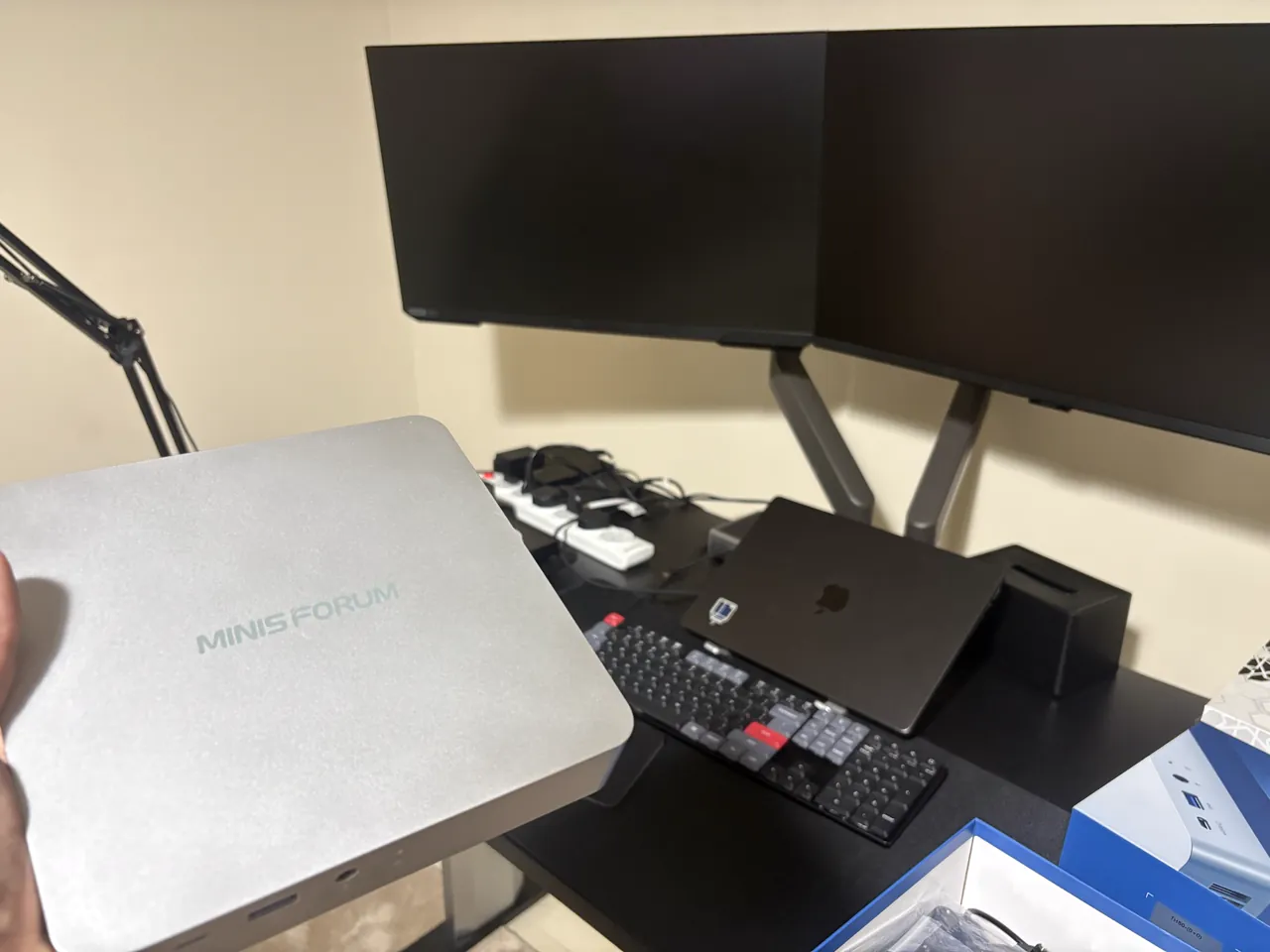
On August 23, 2026, I bought a used Minisforum TH80 for $400.
| Component | My setup |
|---|---|
| CPU | Intel Core i7-11800H, 8 cores, 16 threads |
| RAM | 32 GB |
| Storage | 1 TB NVMe, plus a spare 500 GB drive |
| OS | Ubuntu Server 26.04 LTS |
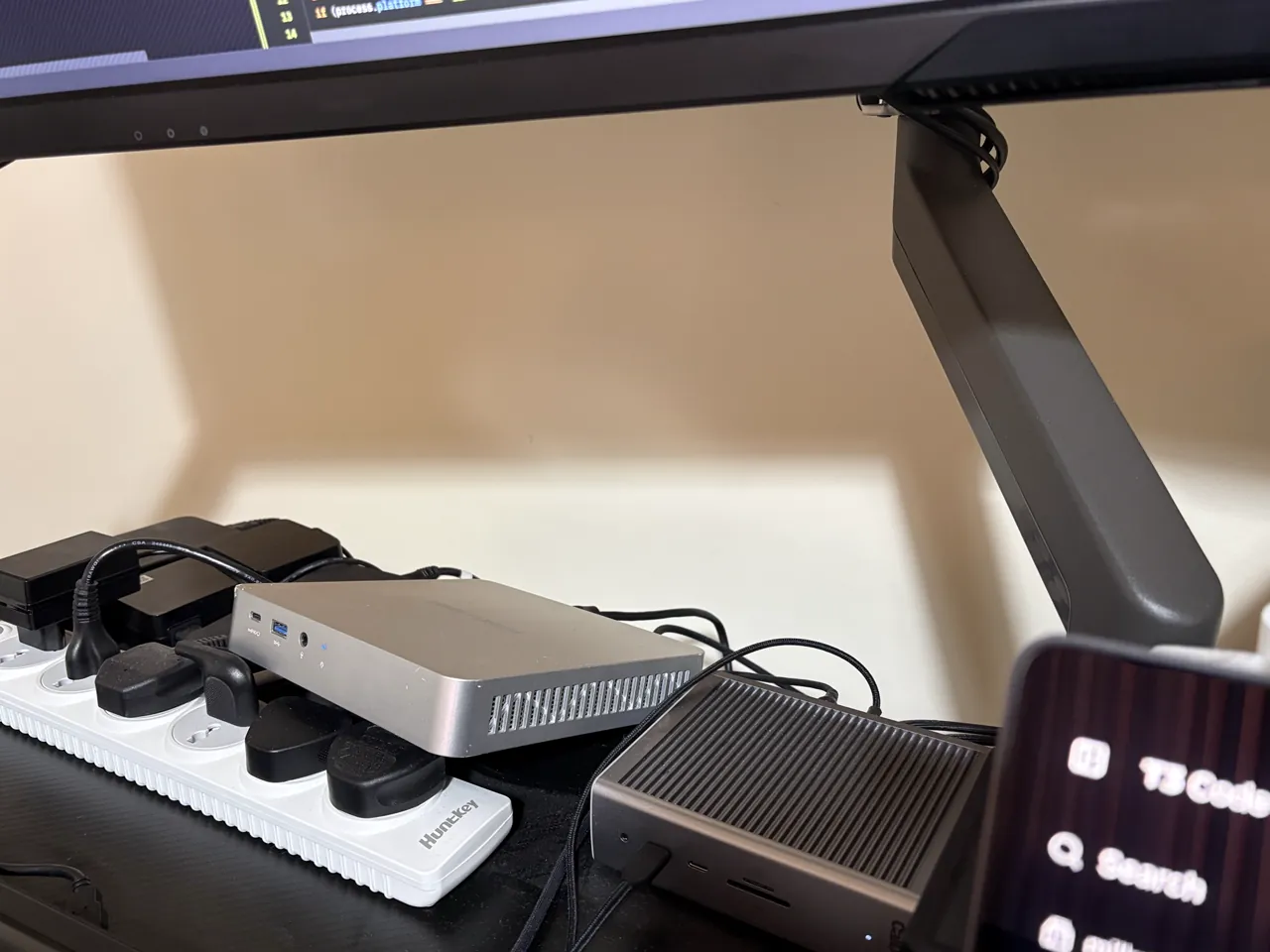
It's overkill. The models run at OpenAI and Anthropic. The box runs everything around them: repos, builds, tests, and browsers. That needs CPU, memory, and disk, not a GPU, so an older machine or an old laptop would probably do. Mine sits under my monitor on Wi-Fi, with no screen or keyboard, and costs a few dollars a month in electricity.
How it fits together#
Ubuntu Server runs the agents and their tools. Tailscale puts the mini PC, MacBook, and iPhone on one private network, which Tailscale calls a tailnet. T3 Code is the app I talk to the agents through.
Guides like Claude Code On-The-Go and Doom Coding control the agents from a terminal app on the phone. That works, but I wanted Codex and Claude side by side in one app on my laptop and phone, where I can start research, coding, or test runs and follow up on them, even by voice.
A normal day#
From the MacBook, I pick a project in T3 and give an agent a task. Then I close the lid and check in from my iPhone on the way. Later, I pick up the same thread on whichever device is in front of me.
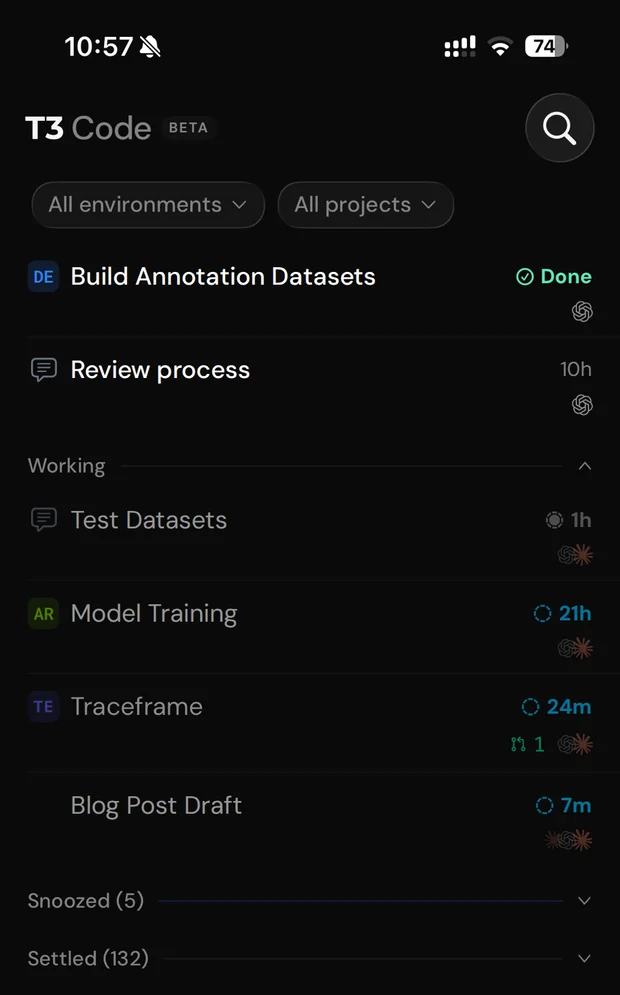
When I go somewhere without the MacBook, I tap the mic in the T3 app on my iPhone and describe what I want, and an agent on the mini PC starts on it while I keep moving.
The weekend I left it alone#
Once my agents could run 24/7, I started wondering what I could hand them that I couldn't before. The first answer was training an AI model.
Tuning the training setup meant run after run with different settings and parameters, to see which changes helped. That kind of work needs someone watching it. I didn't have the time.
There's a laptop with a GPU on my home network, and the agents on the mini PC can reach it over SSH. So I gave one of them the job. More or less: here's a GPU machine you can use, you have 48 uninterrupted hours, train and experiment until you find a better setup and a better model, and don't wait for me, because I won't be around.
Then I mostly wasn't. It was the weekend. I had other work to do and a lot of sleep to catch up on. I peeked in a few times, just curious how it was going.
The agent did its own research, planned experiments, ran them on the GPU laptop, and kept going. It wrote its plan and progress to files, and it set up a scheduled task in T3 that posted a prompt to its own thread every 10 to 30 minutes. Each prompt started a new turn that began by reading those files.
Two days later, I opened the thread on my MacBook and read its findings. It hadn't found a better model, because the setup had limits that tuning wouldn't fix. The next step was to try other types of models.
Getting that answer took about 35 hours of experiments, and I didn't run any of them.
So I asked it to look for other kinds and sizes of models without those limits. Over the following week, it found training data and trained new models on the GPU laptop. One of them is better overall than the model I started with.
Set up your own mini PC for coding agents#
If you want one too, you'll need:
- the mini PC, plus a USB stick, keyboard, and monitor for the install
- a laptop with a coding agent on it, like Codex or Claude Code
- a Tailscale account, plus ChatGPT and Claude subscriptions for Codex and Claude Code
Before you start, turn on device-code login in your ChatGPT security settings (on a work account, your workspace admin turns it on). Without it, Codex's device flow won't work on the mini PC.
1. Install Ubuntu Server#
Plug a keyboard and monitor into the mini PC, and boot it from a USB stick with Ubuntu Server on it. The installer walks you through a series of screens. Keep the defaults, except on these four:
- Network: connect to your Wi-Fi.
- Storage: the installer erases the disk you choose, so back it up and make sure it's the right one. Leave disk encryption off, or the box waits for a passphrase after every power cut.
- Profile: pick a short server name. It becomes the machine's name on Tailscale.
- SSH: tick Install OpenSSH server, and keep password login on for now.
When the install finishes, log in and note the IP from hostname -I. Then, if your BIOS has a setting that powers the machine back on when electricity returns (often Restore on AC Power Loss), turn it on. After that, you can unplug the keyboard and monitor.
2. Copy your SSH key#
Run these on your laptop, the computer where your agent already runs. If you don't have ~/.ssh/id_ed25519 yet, create it first with ssh-keygen -t ed25519. Then, with your own username and IP:
ssh-copy-id -i ~/.ssh/id_ed25519.pub your-user@192.168.1.50
ssh your-user@192.168.1.50
When the first command asks if you trust the mini PC, type yes. It then asks for the Ubuntu password once and copies your laptop's public key to the mini PC. From then on, the mini PC recognizes your laptop, and the second command logs you in without the Ubuntu password. Type exit to get back to your laptop.
3. Hand it to your agent#
Give the agent this prompt, with your own username and IP:
I installed Ubuntu Server on a dedicated machine for coding agents. You can reach it at
your-user@192.168.1.50with this computer's SSH key. Inspect it first, then follow the current official docs to:
- Grow the root volume to fill the disk.
- Install Tailscale on that machine and on this one, and walk me through joining both to my tailnet and turning off key expiry for that machine, so it stays on the tailnet.
- Install T3 Code, Codex, and Claude Code. Keep exactly one copy of each tool, and make sure my shell and the T3 service use the same executables.
- Run T3 as a background service that starts at boot, survives logout, and is reachable only through Tailscale's HTTPS address, not the local network or T3 Connect.
- Keep T3 responsive when agents use all the memory (
t3 service protect).- Set up T3's browser on that machine (
t3 browser setup).- Remove boot delays: no waiting for network interfaces that aren't plugged in, and a short GRUB timeout if another OS, like Windows, is still on a different drive.
- Once you can SSH in over Tailscale, switch to it, then turn off SSH password login and set the firewall to accept incoming connections only over Tailscale.
Give me any
sudocommand you need me to run, and walk me through each sign-in. Verify everything at the end, including a reboot.
The agent runs the commands over SSH. While it works, you handle two things yourself:
- sudo. An SSH key doesn't make you root, so the agent gives you the admin commands, and you run them over SSH with your Ubuntu password.
- Sign-ins. Tailscale, Codex, and Claude each need your account. Each login starts on the mini PC and finishes in your browser, though Claude may give you a code to paste back into the terminal.
Once the agent turns on the firewall, the mini PC only accepts connections over Tailscale. From then on, log in with ssh your-user@your-server-name, using the server name from step 1.
4. Pair your laptop and phone#
Install the T3 app on your laptop and phone, and Tailscale on your phone, signed in to the same tailnet. Then:
- On the mini PC, run
t3 pair --tailscale. It prints a one-time link that expires after 5 minutes. Treat it like a password. - In the desktop app, open Settings → Environments → Add environment and paste the link.
- For your phone, run the command again, open Add environment in the T3 app, and scan the new QR code.
If T3 says Tailscale Serve isn't enabled, turn on HTTPS certificates on Tailscale's DNS page, then run the command again.
5. Check that it worked#
In T3, start a thread on the mini PC (it doesn't need a project yet) and ask the agent to run hostname. It should print the server name you picked in step 1. Then give it a task that takes a few minutes. Close your laptop while it works, and open the same thread on your phone. If you can follow the task to the end there, the core setup works.
To confirm the details, run these on the mini PC:
- The root volume fills the disk.
df -h /shows aSizeclose to the disk you installed to, not about 100G. - T3's service is installed and protected.
t3 service statusshowsStatus: installedandMemory protection: on. - It survives logout.
loginctl show-user "$USER" -p LingershowsLinger=yes. - It's private. In
t3 statusandtailscale serve status,T3 ConnectandLocal networkareoff, and T3 is behind your tailnet HTTPS address, marked(tailnet only). - Only Tailscale gets in.
sudo ufw status verboseshowsStatus: active,Default: deny (incoming), and allow rules only ontailscale0. - SSH takes keys only. Both lines of
sudo sshd -T | grep -e passwordauth -e kbdinteractiveend inno. - Boot is quick. Reboot, then run
systemd-analyze. There's no long network wait, and T3 is back without you logging in.
6. Bring your projects and history#
Clone your repos, run their setup (at MilkStraw AI, that mostly means mise), and add each one as a project in T3. For private repos, the box needs its own access to your Git host. If a project runs services in Docker, bind their ports to 127.0.0.1, so only the box itself can reach them.
I also copied my Claude history over SSH, so agents on the box can search old decisions. Claude Code keeps it in ~/.claude/projects. From your laptop, over Tailscale:
scp -r ~/.claude/projects your-user@your-server-name:claude-historyThat puts it in ~/claude-history on the box. When I want an agent to pick up work I started on the MacBook, I tell it to look there. Keep that copy private, since history can hold credentials.
Things that bit me#
- Two copies of the same tool. After an update, T3 kept launching the old Codex, because my shell and T3 found different copies from mise and npm. Now there's one shared install, and T3's Binary path setting can pin the right one.
- Two T3 servers. The desktop app had started its own T3 server over SSH, next to the background service, and switching devices caused thread conflicts. Pairing every device with the one service fixed it.
localhostis your laptop. A dev server on the mini PC isn't atlocalhostin your MacBook's browser. Tell your agent to expose it on the tailnet, or use T3's remote browser.- Docker gets past your firewall. With the firewall on, another machine on my Wi-Fi could still reach every port Docker published. Bind dev ports to the box itself in your compose file, like
"127.0.0.1:5433:5432".
Keeping the box safe#
My agents use T3's Full access mode, so they run commands and edit files without asking me first. A dedicated box limits what they can reach, but it doesn't make them safe. Beyond choosing what goes on it:
sudostill asks for my password, but my user can also run Docker, which is as good as root.- SSH takes keys only, and the firewall turns away anything that doesn't come in over Tailscale, following Tailscale's own guide. Docker's published ports are the exception.
- T3 listens only on the box itself, behind a Tailscale HTTPS address that only my devices can reach. It isn't on the public internet.
- Access goes one way. My MacBook can SSH into the mini PC, but the mini PC has no keys or passwords for my MacBook. When something has to run on the Mac, like testing our browser-recording tool Traceframe on macOS, I start an agent on the MacBook for that part, and it reports the results back to the mini PC over SSH.
- The GPU laptop is the opposite. It's a clean Ubuntu install on my home Wi-Fi, with no data on it and no access to anything else, so I gave the mini PC full access to it for training and experiments. There, I set up sudo so it doesn't ask for a password, which lets agents run admin commands without waiting for me.
- Security updates install themselves, through Ubuntu's unattended upgrades. Kernel updates still need a reboot to take effect.
- The disk isn't encrypted, so the box can boot by itself after a power cut (step 1). Anyone who walks off with it can read everything on it, including the agent history. For a box at home, I'm fine with that.
FAQ#
Why not keep the MacBook awake instead? There are tools that keep a Mac awake, even with the lid closed. But then the MacBook still runs everything on battery and my iPhone's hotspot, and the agents are still on my everyday machine.
Why not rent a cloud machine? You can, and it solves the home power and internet problem. Here's how long the $400 takes to pay for itself at November 2026 list prices, counting $4 a month for electricity:
| Instead of the box | Size | Per month | Pays back in |
|---|---|---|---|
AWS EC2 c6g.4xlarge + 1 TB disk | 16 vCPU, 32 GB | about $480 | 1 month |
AWS EC2 t4g.xlarge + 200 GB disk | 4 vCPU, 16 GB | about $115 | 4 months |
| Amp Orbs on two $20 plans | 4 CPU, 8 GB per agent | $40 | 12 months |
| DigitalOcean Basic Droplet | 2 vCPU, 4 GB | $24 | 20 months |
- The AWS rows use on-demand Linux prices in us-east-1 for a machine that runs all month (730 hours), plus a gp3 disk.
c6g.4xlargehas as many vCPUs as my box has threads, and the same 32 GB, though on Arm.t4g.xlargeis a smaller, burstable option for running fewer agents at once.- Amp's Orbs are cloud computers for Amp's own agents, billed only while they run. Two $20 plans, the limit for one person, would cover most of my 900 hours at 4 CPU and 8 GB.
- The Droplet is a typical small VPS.
Money isn't the main argument, though. A small VPS has far less CPU and memory for several agents running builds and browsers at once, and my GPU laptop sits on the same network as the box.
What's the catch? It's another computer to maintain. When the power at home goes out, so does the box. When the internet drops, the box keeps running, but the agents can't reach their models and I can't reach the box when I'm away from home.
Why not Claude's Remote Control? It lets your phone drive a Claude Code session, but the session still runs on the machine that started it. If that's your laptop, it has to stay awake. It's also Claude only.
Can I use an old laptop instead?
Yes, with Ubuntu Server on it. Keep it plugged in, and stop the lid from putting it to sleep: in /etc/systemd/logind.conf, change #HandleLidSwitch=suspend to HandleLidSwitch=ignore (it needs sudo), then reboot.
What happens when the power goes out? When the power comes back, the box turns back on (that's the BIOS setting from step 1), boots, and starts T3 by itself. With Continue threads after restarts on, which is the default, T3 then resumes the threads that were running, if their agent supports it. A command that was mid-run, like a test suite, gets cut off, so the agent may run it again.
What changed for me#
I'd heard people describe setups like this many times, and I didn't see the point until I tried one. My local setup already felt good enough.
The first change is the obvious one. When I need to leave, I close the lid, and the agents keep working.
The second took longer to see. On my MacBook, I was always a bit afraid to give agents more room, because of everything else they could reach. On the box, I decide what's in reach, so I let them go further.
Once agents have more room, you start finding more for them to do. That's how the weekend of GPU training happened, and I wouldn't have tried it while they lived on my MacBook.
If your agents still live on your laptop, give them a machine of their own.