In Part 1, we set up the WebAuthn gem, created the database schema, and built passkey registration. Users can now add passkeys to their accounts.
In this post, we'll implement the full Rails authentication flow. We'll start with password-full WebAuthn 2FA (password + passkey), then add password-less authentication (passkey only) for a truly secure sign-in experience. Finally, we'll clean up the code to settle on the simpler password-less solution.
Why build 2FA first? We want to cover both common use cases. Implementing the password-full flow first ensures we understand the fundamentals of WebAuthn authentication before refactoring to the simpler password-less solution.
Note: If you only want password-less authentication, you can still read the 2FA sections for context on how the authentication flow works, but focus on the password-less and "Cleaning Up" sections for your actual implementation.
Password-Full Authentication (2FA with Passkeys)
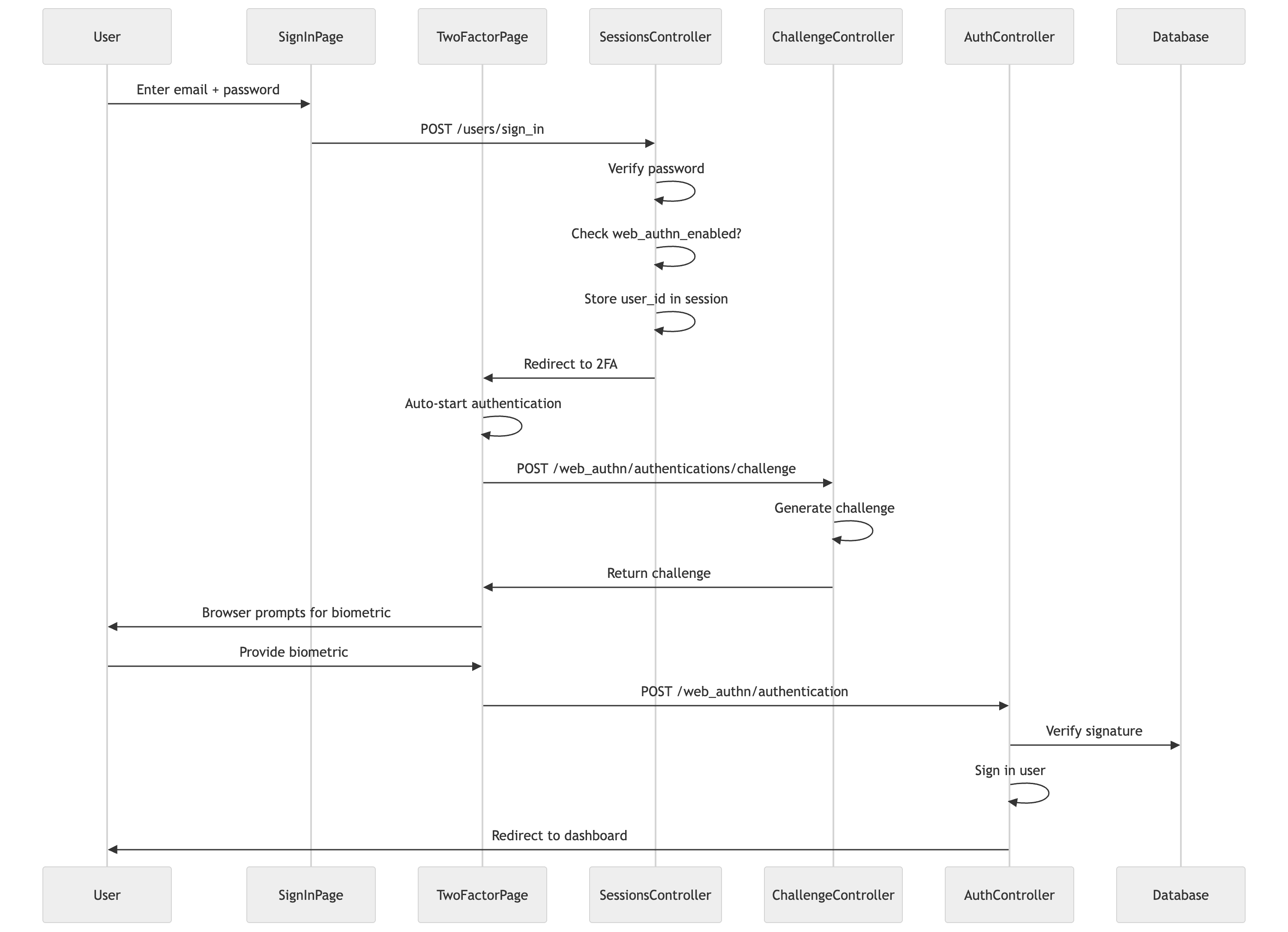
Now that users can register passkeys, we need to verify them during sign-in. In this password-full flow, users first enter their password, then complete 2FA with their passkey.
The Authentication Concern [Backend]
The Authentication concern handles two things: ensuring users are signed in, and enforcing WebAuthn 2FA for users who have it enabled:
# app/controllers/concerns/authentication.rbmoduleAuthenticationextendActiveSupport::Concernincludeddobefore_action:authenticate_user!before_action:enforce_web_authn_verificationendprivate# Prevent access to protected routes if WebAuthn 2FA is pending.defenforce_web_authn_verification# If user is already signed in, they've completed authentication -> Clear stale WebAuthn session if it exists.session.delete(WebAuthn::SESSION_KEY) ifuser_signed_in?returnifsession[WebAuthn::SESSION_KEY].blank?redirect_tonew_web_authn_authentication_pathendend
# app/controllers/concerns/authentication.rbmoduleAuthenticationextendActiveSupport::Concernincludeddobefore_action:authenticate_user!before_action:enforce_web_authn_verificationendprivate# Prevent access to protected routes if WebAuthn 2FA is pending.defenforce_web_authn_verification# If user is already signed in, they've completed authentication -> Clear stale WebAuthn session if it exists.session.delete(WebAuthn::SESSION_KEY) ifuser_signed_in?returnifsession[WebAuthn::SESSION_KEY].blank?redirect_tonew_web_authn_authentication_pathendend
# app/controllers/concerns/authentication.rbmoduleAuthenticationextendActiveSupport::Concernincludeddobefore_action:authenticate_user!before_action:enforce_web_authn_verificationendprivate# Prevent access to protected routes if WebAuthn 2FA is pending.defenforce_web_authn_verification# If user is already signed in, they've completed authentication -> Clear stale WebAuthn session if it exists.session.delete(WebAuthn::SESSION_KEY) ifuser_signed_in?returnifsession[WebAuthn::SESSION_KEY].blank?redirect_tonew_web_authn_authentication_pathendend
The enforce_web_authn_verification method is the key to password-full 2FA. After a user signs in with their password, if they have WebAuthn enabled, they get redirected to the 2FA page. This method intercepts requests and ensures they complete 2FA before accessing protected routes.
It also handles edge cases: if a different user abandoned their 2FA attempt and someone else signed in, we clear the stale session.
Important: You need to skip this callback in controllers that handle public requests or the 2FA flow itself. Otherwise users would be stuck in a redirect loop:
The pattern is simple: any controller action that a user might hit before completing 2FA needs the skip.
The PendingAuthentication Concern [Backend]
We also need a concern for controllers that handle the 2FA flow. These controllers work with users who haven't fully signed in yet. They need to retrieve the pending user from the session, complete the sign-in when verification succeeds, and clean up the session appropriately:
ensure_pending_authentication is a before_action guard. It prevents users from accessing 2FA pages directly without first starting the authentication flow. If someone navigates to /web_authn/authentication/new without a pending session, they get redirected to sign-in.
pending_user retrieves the user from the session. During the 2FA flow, we store the user's ID (not the user object) in the session. This method looks them up. It returns nil if the user doesn't exist or if the session has expired.
complete_sign_in finishes the authentication. It handles several things: restoring where the user was trying to go before authentication, cleaning up the pending session, and actually signing them in. Note that we always set remember: true. This was a deliberate decision. Users who authenticate with passkeys have proven possession of a secure device, so there's no need to make them re-authenticate frequently.
The Routes [Backend]
Add the authentication routes:
# config/routes.rbnamespace:web_authndo# ... credentials routes from Part 1resource:authentication, only: %i[newcreate]
namespace:authenticationsdoresource:challenge, only::createendend
# config/routes.rbnamespace:web_authndo# ... credentials routes from Part 1resource:authentication, only: %i[newcreate]
namespace:authenticationsdoresource:challenge, only::createendend
# config/routes.rbnamespace:web_authndo# ... credentials routes from Part 1resource:authentication, only: %i[newcreate]
namespace:authenticationsdoresource:challenge, only::createendend
This gives us:
GET /web_authn/authentication/new - The 2FA page
POST /web_authn/authentications/challenge - Get authentication options (separate controller)
POST /web_authn/authentication - Verify the passkey
We put the challenge in its own controller. It's a distinct responsibility (generating options) from the main authentication controller (verifying credentials). This follows the single-responsibility principle and keeps each controller focused.
Modifying Devise's Sessions Controller [Backend]
We modify how Devise handles sign-in to redirect users with WebAuthn to the 2FA page after they enter their password:
First, we skip enforce_web_authn_verification for the sessions controller actions. This concern (defined earlier) would redirect users to 2FA, but we need to handle the sign-in flow ourselves here:
We store the user's ID and the location they were trying to access in the WebAuthn session. After they complete 2FA, we'll redirect them to that location.
For users without WebAuthn, we sign them in normally with remember: true. We decided not to show a "remember me" checkbox. With modern session security, keeping users signed in is the better UX.
The Challenge Controller [Backend]
The challenge is in its own controller. It generates authentication options:
Unlike registration, authentication uses options_for_get. The allow parameter restricts which credentials can be used. The user_verification: 'discouraged' setting matches what we used during registration. For 2FA, the password already provides one factor, so we only need the authenticator to prove presence (touch), not verify the user's identity again with a PIN or biometric. If a user has multiple passkeys, any of them will work. We store the challenge in the existing WebAuthn session.
If someone clones a hardware key, the sign counts will diverge. The legitimate key might have sign_count 50, but the clone starts at 0. The verification will fail because the presented count is lower than expected.
The Two-Factor Auth Page [Frontend]
The 2FA page needs to handle several states: loading, authenticating, errors, and a fallback to backup codes (which we'll add later in Part 3). Let's build it up:
<scriptsetuplang="ts">import{router}from'@inertiajs/vue3'import{browserSupportsWebAuthn,startAuthentication}from'@simplewebauthn/browser'import{onMounted,ref}from'vue'import{new_user_session_path,web_authn_authentication_path,web_authn_authentications_challenge_path}from'~/routes.js'import{getCsrfToken}from'~/utils/csrf'// State managementconstisSupported = ref(true)constisAuthenticating = ref(false)consterror = ref<string | null>(null)// Check WebAuthn support and auto-start authenticationonMounted(async()=>{isSupported.value = browserSupportsWebAuthn()// Auto-start WebAuthn authentication if supported// This is key for good UX - users don't need to click another buttonif(isSupported.value){awaitauthenticate()}})</script>
<scriptsetuplang="ts">import{router}from'@inertiajs/vue3'import{browserSupportsWebAuthn,startAuthentication}from'@simplewebauthn/browser'import{onMounted,ref}from'vue'import{new_user_session_path,web_authn_authentication_path,web_authn_authentications_challenge_path}from'~/routes.js'import{getCsrfToken}from'~/utils/csrf'// State managementconstisSupported = ref(true)constisAuthenticating = ref(false)consterror = ref<string | null>(null)// Check WebAuthn support and auto-start authenticationonMounted(async()=>{isSupported.value = browserSupportsWebAuthn()// Auto-start WebAuthn authentication if supported// This is key for good UX - users don't need to click another buttonif(isSupported.value){awaitauthenticate()}})</script>
<scriptsetuplang="ts">import{router}from'@inertiajs/vue3'import{browserSupportsWebAuthn,startAuthentication}from'@simplewebauthn/browser'import{onMounted,ref}from'vue'import{new_user_session_path,web_authn_authentication_path,web_authn_authentications_challenge_path}from'~/routes.js'import{getCsrfToken}from'~/utils/csrf'// State managementconstisSupported = ref(true)constisAuthenticating = ref(false)consterror = ref<string | null>(null)// Check WebAuthn support and auto-start authenticationonMounted(async()=>{isSupported.value = browserSupportsWebAuthn()// Auto-start WebAuthn authentication if supported// This is key for good UX - users don't need to click another buttonif(isSupported.value){awaitauthenticate()}})</script>
We check browser support on mount and immediately start authentication if supported. This reduces friction. Users don't have to click "Sign in with passkey" after already entering their password.
The authentication function:
<scriptsetuplang="ts">// ... previous codeasyncfunctionauthenticate(){isAuthenticating.value = trueerror.value = nulltry{// Step 1: Get challenge from server// This is a separate request from the actual authentication// because we need the server to generate a fresh challengeconstchallengeResponse = awaitfetch(web_authn_authentications_challenge_path(),{method:'POST',headers:{'Content-Type':'application/json','X-CSRF-Token':getCsrfToken()}})if(!challengeResponse.ok){constdata = awaitchallengeResponse.json()thrownewError(data.error || 'Failed to get authentication challenge')}constoptionsJSON = awaitchallengeResponse.json()// Step 2: Start browser authentication// This triggers the browser's native passkey UI// The user will see a prompt to use Touch ID, Face ID, etc.constauthResponse = awaitstartAuthentication({optionsJSON})// Step 3: Send to server for verification// We use Inertia here so we get proper redirects on successrouter.post(web_authn_authentication_path(),{credential:JSON.parse(JSON.stringify(authResponse))})}catch(err){// Handle browser-level errorsif(errinstanceofError){if(err.name === 'NotAllowedError'){// User cancelled the prompt or it timed outerror.value = 'Authentication was cancelled or timed out.'}else{error.value = err.message}}else{error.value = 'An unexpected error occurred.'}isAuthenticating.value = false}}// Allow user to go back to sign-in page// This is important - they might realize they're on the wrong accountfunctiongoBack(){router.visit(new_user_session_path())}</script>
<scriptsetuplang="ts">// ... previous codeasyncfunctionauthenticate(){isAuthenticating.value = trueerror.value = nulltry{// Step 1: Get challenge from server// This is a separate request from the actual authentication// because we need the server to generate a fresh challengeconstchallengeResponse = awaitfetch(web_authn_authentications_challenge_path(),{method:'POST',headers:{'Content-Type':'application/json','X-CSRF-Token':getCsrfToken()}})if(!challengeResponse.ok){constdata = awaitchallengeResponse.json()thrownewError(data.error || 'Failed to get authentication challenge')}constoptionsJSON = awaitchallengeResponse.json()// Step 2: Start browser authentication// This triggers the browser's native passkey UI// The user will see a prompt to use Touch ID, Face ID, etc.constauthResponse = awaitstartAuthentication({optionsJSON})// Step 3: Send to server for verification// We use Inertia here so we get proper redirects on successrouter.post(web_authn_authentication_path(),{credential:JSON.parse(JSON.stringify(authResponse))})}catch(err){// Handle browser-level errorsif(errinstanceofError){if(err.name === 'NotAllowedError'){// User cancelled the prompt or it timed outerror.value = 'Authentication was cancelled or timed out.'}else{error.value = err.message}}else{error.value = 'An unexpected error occurred.'}isAuthenticating.value = false}}// Allow user to go back to sign-in page// This is important - they might realize they're on the wrong accountfunctiongoBack(){router.visit(new_user_session_path())}</script>
<scriptsetuplang="ts">// ... previous codeasyncfunctionauthenticate(){isAuthenticating.value = trueerror.value = nulltry{// Step 1: Get challenge from server// This is a separate request from the actual authentication// because we need the server to generate a fresh challengeconstchallengeResponse = awaitfetch(web_authn_authentications_challenge_path(),{method:'POST',headers:{'Content-Type':'application/json','X-CSRF-Token':getCsrfToken()}})if(!challengeResponse.ok){constdata = awaitchallengeResponse.json()thrownewError(data.error || 'Failed to get authentication challenge')}constoptionsJSON = awaitchallengeResponse.json()// Step 2: Start browser authentication// This triggers the browser's native passkey UI// The user will see a prompt to use Touch ID, Face ID, etc.constauthResponse = awaitstartAuthentication({optionsJSON})// Step 3: Send to server for verification// We use Inertia here so we get proper redirects on successrouter.post(web_authn_authentication_path(),{credential:JSON.parse(JSON.stringify(authResponse))})}catch(err){// Handle browser-level errorsif(errinstanceofError){if(err.name === 'NotAllowedError'){// User cancelled the prompt or it timed outerror.value = 'Authentication was cancelled or timed out.'}else{error.value = err.message}}else{error.value = 'An unexpected error occurred.'}isAuthenticating.value = false}}// Allow user to go back to sign-in page// This is important - they might realize they're on the wrong accountfunctiongoBack(){router.visit(new_user_session_path())}</script>
The flow is: get challenge, trigger browser UI, send response to server. If authentication succeeds, the server redirects automatically (via Inertia). If it fails, we show an error and let the user retry.
The template:
<template><AuthLayout><template#top-bar><UButtonvariant="outline"size="sm"@click="goBack">
Back to sign in
</UButton></template><template#card-content><divclass="flex flex-col gap-6"><AuthHeadericon="i-hugeicons-finger-print"title="Let's make sure it's you"/><pclass="text-muted text-center text-sm">Use fingerprint, face, screen lock, or security key to sign in.</p><!-- Browser doesn't support WebAuthn --><UAlertv-if="!isSupported"color="error"variant="soft"title="WebAuthn Not Supported"description="Your browser does not support WebAuthn. Please use a modern browser."icon="i-hugeicons-alert-circle"/><!-- Error message with retry option --><UAlertv-if="error"color="error"variant="soft":title="error"icon="i-hugeicons-alert-circle":close-button="{icon:'i-hugeicons-cancel-01',color:'error',variant:'link'}"@close="error = null"/><!-- Primary action button --><UButton:disabled="!isSupported || isAuthenticating":loading="isAuthenticating"blocksize="lg"@click="authenticate"><template#leading><UIconv-if="!isAuthenticating"name="i-hugeicons-finger-print"/></template>
{{ isAuthenticating ? 'Verifying...' : 'Sign in with passkey'}}</UButton></div></template></AuthLayout></template>
<template><AuthLayout><template#top-bar><UButtonvariant="outline"size="sm"@click="goBack">
Back to sign in
</UButton></template><template#card-content><divclass="flex flex-col gap-6"><AuthHeadericon="i-hugeicons-finger-print"title="Let's make sure it's you"/><pclass="text-muted text-center text-sm">Use fingerprint, face, screen lock, or security key to sign in.</p><!-- Browser doesn't support WebAuthn --><UAlertv-if="!isSupported"color="error"variant="soft"title="WebAuthn Not Supported"description="Your browser does not support WebAuthn. Please use a modern browser."icon="i-hugeicons-alert-circle"/><!-- Error message with retry option --><UAlertv-if="error"color="error"variant="soft":title="error"icon="i-hugeicons-alert-circle":close-button="{icon:'i-hugeicons-cancel-01',color:'error',variant:'link'}"@close="error = null"/><!-- Primary action button --><UButton:disabled="!isSupported || isAuthenticating":loading="isAuthenticating"blocksize="lg"@click="authenticate"><template#leading><UIconv-if="!isAuthenticating"name="i-hugeicons-finger-print"/></template>
{{ isAuthenticating ? 'Verifying...' : 'Sign in with passkey'}}</UButton></div></template></AuthLayout></template>
<template><AuthLayout><template#top-bar><UButtonvariant="outline"size="sm"@click="goBack">
Back to sign in
</UButton></template><template#card-content><divclass="flex flex-col gap-6"><AuthHeadericon="i-hugeicons-finger-print"title="Let's make sure it's you"/><pclass="text-muted text-center text-sm">Use fingerprint, face, screen lock, or security key to sign in.</p><!-- Browser doesn't support WebAuthn --><UAlertv-if="!isSupported"color="error"variant="soft"title="WebAuthn Not Supported"description="Your browser does not support WebAuthn. Please use a modern browser."icon="i-hugeicons-alert-circle"/><!-- Error message with retry option --><UAlertv-if="error"color="error"variant="soft":title="error"icon="i-hugeicons-alert-circle":close-button="{icon:'i-hugeicons-cancel-01',color:'error',variant:'link'}"@close="error = null"/><!-- Primary action button --><UButton:disabled="!isSupported || isAuthenticating":loading="isAuthenticating"blocksize="lg"@click="authenticate"><template#leading><UIconv-if="!isAuthenticating"name="i-hugeicons-finger-print"/></template>
{{ isAuthenticating ? 'Verifying...' : 'Sign in with passkey'}}</UButton></div></template></AuthLayout></template>
The UI is simple: a title, description, error display, and a big button. If authentication is happening, we show a loading state. If it failed, users can click to retry.
We'll add backup code support to this same page later in Part 3. For now, this handles the passkey-only flow.
What Can Go Wrong
Authentication issues to watch for:
Session mismatch: If a user has multiple tabs open and signs in on one, the other tab's 2FA session becomes stale. The enforce_web_authn_verification concern checks for this and clears orphaned sessions.
Wrong credential: Users with multiple passkeys might present the wrong one. The verification will fail because the signature doesn't match the stored public key. This is expected behavior - they just need to try their other passkey.
Browser doesn't support WebAuthn: Some browsers (especially older mobile browsers) don't support WebAuthn. Check for support before showing passkey options and have a fallback.
Password-Less Authentication
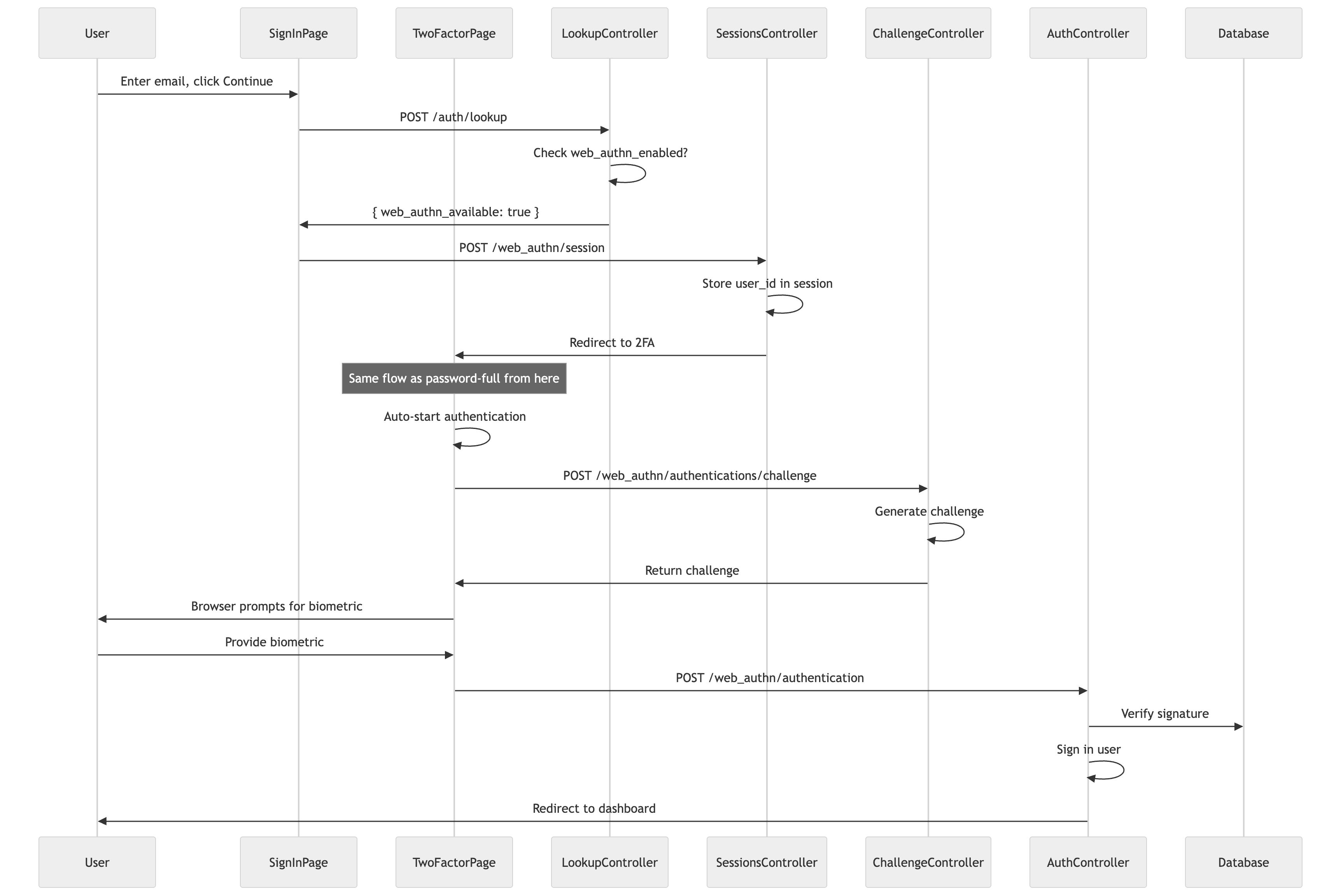
Password-full works. Now let's add password-less. Users with passkeys should be able to skip the password entirely. This is where passkeys become genuinely better than passwords, not just an extra step.
The Lookup Controller [Backend]
We need a way to check if a user has passkeys before showing them the password form. Add the routes:
# app/controllers/auth/lookups_controller.rbclassAuth::LookupsController < ApplicationControllerskip_before_action:authenticate_user!rate_limitto:5, within:1.minutedefcreateuser = User.find_by(email:params[:email].to_s.strip.downcase)
# For security, we don't reveal if the user exists or not.# We just return whether WebAuthn is available (which requires the user to exist).renderjson: { web_authn_available:user&.web_authn_enabled? || false }
endend
# app/controllers/auth/lookups_controller.rbclassAuth::LookupsController < ApplicationControllerskip_before_action:authenticate_user!rate_limitto:5, within:1.minutedefcreateuser = User.find_by(email:params[:email].to_s.strip.downcase)
# For security, we don't reveal if the user exists or not.# We just return whether WebAuthn is available (which requires the user to exist).renderjson: { web_authn_available:user&.web_authn_enabled? || false }
endend
# app/controllers/auth/lookups_controller.rbclassAuth::LookupsController < ApplicationControllerskip_before_action:authenticate_user!rate_limitto:5, within:1.minutedefcreateuser = User.find_by(email:params[:email].to_s.strip.downcase)
# For security, we don't reveal if the user exists or not.# We just return whether WebAuthn is available (which requires the user to exist).renderjson: { web_authn_available:user&.web_authn_enabled? || false }
endend
This is intentionally minimal. The lookup endpoint alone doesn't reveal whether an email exists in our system. It returns false both when the user doesn't exist and when they exist but have no passkeys.
Security note: While this endpoint is safe in isolation, an attacker could combine it with the sessions endpoint (below) to enumerate users. If lookup returns false and the sessions endpoint returns 404, the user definitely doesn't exist. If lookup returns false but sessions redirects, the user exists but has no passkeys. We accept this trade-off for simplicity, but if user enumeration is a concern for your application, you could modify the sessions controller to always redirect (storing an invalid user ID for non-existent users, so the 2FA page shows a generic "Session expired" error either way). Rate limiting on both endpoints helps mitigate enumeration attempts.
The Sessions Controller (Password-Less Path) [Backend]
Now we need a way to start the WebAuthn flow without a password. Add another route:
# config/routes.rbnamespace:web_authndoresource:session, only::create# ... other routesend
# config/routes.rbnamespace:web_authndoresource:session, only::create# ... other routesend
# config/routes.rbnamespace:web_authndoresource:session, only::create# ... other routesend
This controller is intentionally simple. It uses find_by! which raises ActiveRecord::RecordNotFound if the user doesn't exist. In normal use, this endpoint is only called after the lookup confirms WebAuthn is available. However, as noted above, an attacker could use the 404 vs redirect difference to enumerate users. We accept this trade-off, relying on rate limiting to slow enumeration attempts.
The controller sets up the pending authentication session and redirects directly to the 2FA page. No JSON response, no checking web_authn_enabled?. The lookup already did that work. This keeps the controller focused on one thing: starting the password-less flow.
Adaptive Sign-In Flow [Frontend]
Now we modify the sign-in page to check for passkeys after the user enters their email. The page has three steps: method selection (OAuth or email), email entry, and password entry. We add passkey detection between email and password.
<scriptsetuplang="ts">import{router,useForm}from'@inertiajs/vue3'import{browserSupportsWebAuthn}from'@simplewebauthn/browser'import{ref,computed}from'vue'import{auth_lookup_path,web_authn_session_path,new_user_session_path,new_user_password_path}from'~/routes.js'import{getCsrfToken}from'~/utils/csrf'// Step management: 'method' -> 'email' -> 'password' (or redirect to passkey)type Step = 'method' | 'email' | 'password'conststep = ref<Step>('method')// Form stateconstemail = ref('')constisLookingUp = ref(false)constlookupError = ref<string | null>(null)// Password form for non-WebAuthn usersconstform = useForm({user:{email:'',password:''}})// Check browser support onceconstsupportsWebAuthn = computed(()=>browserSupportsWebAuthn())// Computed: forgot password URL with email pre-filledconstforgotPasswordPath = computed(()=>{constbase = new_user_password_path()constemailValue = form.user.email.trim()if(!emailValue)returnbasereturn`${base}?email=${encodeURIComponent(emailValue)}`})</script>
<scriptsetuplang="ts">import{router,useForm}from'@inertiajs/vue3'import{browserSupportsWebAuthn}from'@simplewebauthn/browser'import{ref,computed}from'vue'import{auth_lookup_path,web_authn_session_path,new_user_session_path,new_user_password_path}from'~/routes.js'import{getCsrfToken}from'~/utils/csrf'// Step management: 'method' -> 'email' -> 'password' (or redirect to passkey)type Step = 'method' | 'email' | 'password'conststep = ref<Step>('method')// Form stateconstemail = ref('')constisLookingUp = ref(false)constlookupError = ref<string | null>(null)// Password form for non-WebAuthn usersconstform = useForm({user:{email:'',password:''}})// Check browser support onceconstsupportsWebAuthn = computed(()=>browserSupportsWebAuthn())// Computed: forgot password URL with email pre-filledconstforgotPasswordPath = computed(()=>{constbase = new_user_password_path()constemailValue = form.user.email.trim()if(!emailValue)returnbasereturn`${base}?email=${encodeURIComponent(emailValue)}`})</script>
<scriptsetuplang="ts">import{router,useForm}from'@inertiajs/vue3'import{browserSupportsWebAuthn}from'@simplewebauthn/browser'import{ref,computed}from'vue'import{auth_lookup_path,web_authn_session_path,new_user_session_path,new_user_password_path}from'~/routes.js'import{getCsrfToken}from'~/utils/csrf'// Step management: 'method' -> 'email' -> 'password' (or redirect to passkey)type Step = 'method' | 'email' | 'password'conststep = ref<Step>('method')// Form stateconstemail = ref('')constisLookingUp = ref(false)constlookupError = ref<string | null>(null)// Password form for non-WebAuthn usersconstform = useForm({user:{email:'',password:''}})// Check browser support onceconstsupportsWebAuthn = computed(()=>browserSupportsWebAuthn())// Computed: forgot password URL with email pre-filledconstforgotPasswordPath = computed(()=>{constbase = new_user_password_path()constemailValue = form.user.email.trim()if(!emailValue)returnbasereturn`${base}?email=${encodeURIComponent(emailValue)}`})</script>
The step-based approach lets us show different UI based on where the user is in the flow. Now the email continuation handler:
<scriptsetuplang="ts">// ... previous codeasyncfunctionhandleEmailContinue(){if(!email.value.trim())returnisLookingUp.value = truelookupError.value = nulltry{// First, check if the user has WebAuthn enabled// This is a lightweight check that doesn't reveal user existenceconstresponse = awaitfetch(auth_lookup_path(),{method:'POST',headers:{'Content-Type':'application/json','X-CSRF-Token':getCsrfToken()},body:JSON.stringify({email:email.value.trim()})})if(!response.ok){thrownewError('Failed to check authentication method')}constdata = awaitresponse.json()// Store email for password form (in case we need it)form.user.email = email.value.trim()// If WebAuthn is available, go directly to verificationif(data.web_authn_available){startPasswordlessFlow()}else{// No WebAuthn - show password formstep.value = 'password'isLookingUp.value = false}}catch(err){lookupError.value = errinstanceofError ? err.message : 'An error occurred'isLookingUp.value = false}}</script>
<scriptsetuplang="ts">// ... previous codeasyncfunctionhandleEmailContinue(){if(!email.value.trim())returnisLookingUp.value = truelookupError.value = nulltry{// First, check if the user has WebAuthn enabled// This is a lightweight check that doesn't reveal user existenceconstresponse = awaitfetch(auth_lookup_path(),{method:'POST',headers:{'Content-Type':'application/json','X-CSRF-Token':getCsrfToken()},body:JSON.stringify({email:email.value.trim()})})if(!response.ok){thrownewError('Failed to check authentication method')}constdata = awaitresponse.json()// Store email for password form (in case we need it)form.user.email = email.value.trim()// If WebAuthn is available, go directly to verificationif(data.web_authn_available){startPasswordlessFlow()}else{// No WebAuthn - show password formstep.value = 'password'isLookingUp.value = false}}catch(err){lookupError.value = errinstanceofError ? err.message : 'An error occurred'isLookingUp.value = false}}</script>
<scriptsetuplang="ts">// ... previous codeasyncfunctionhandleEmailContinue(){if(!email.value.trim())returnisLookingUp.value = truelookupError.value = nulltry{// First, check if the user has WebAuthn enabled// This is a lightweight check that doesn't reveal user existenceconstresponse = awaitfetch(auth_lookup_path(),{method:'POST',headers:{'Content-Type':'application/json','X-CSRF-Token':getCsrfToken()},body:JSON.stringify({email:email.value.trim()})})if(!response.ok){thrownewError('Failed to check authentication method')}constdata = awaitresponse.json()// Store email for password form (in case we need it)form.user.email = email.value.trim()// If WebAuthn is available, go directly to verificationif(data.web_authn_available){startPasswordlessFlow()}else{// No WebAuthn - show password formstep.value = 'password'isLookingUp.value = false}}catch(err){lookupError.value = errinstanceofError ? err.message : 'An error occurred'isLookingUp.value = false}}</script>
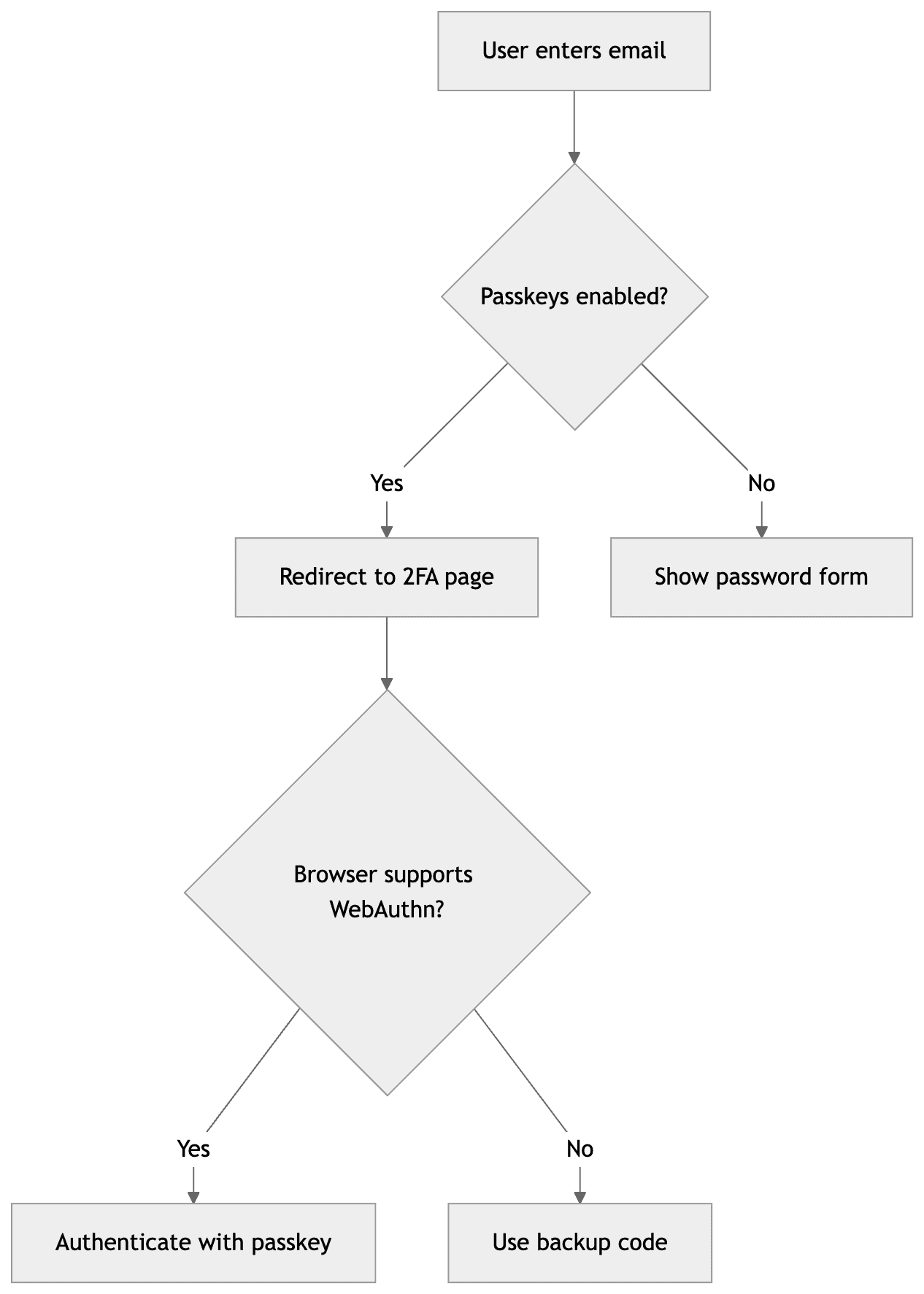
If the user has passkeys enabled, we direct them through the password-less flow. If they don't, we show the password form. If the browser doesn't support WebAuthn, the 2FA page will handle it gracefully and the user can use a backup code to complete authentication.
We use Inertia's router.post() because the sessions controller redirects directly. Inertia handles the redirect automatically and navigates for us. Clean and simple.
The rest of the component handles navigation between steps and the password form:
Email enumeration: The lookup endpoint reveals whether an email has passkeys. We accept this trade-off for UX, but you could add rate limiting or CAPTCHAs if concerned.
Passkey authentication fails: The browser doesn't support WebAuthn, the passkey isn't synced to this device, or user verification fails (no biometrics/PIN configured). The 2FA page shows an error; backup codes provide a fallback (see Part 3).
With password-less working, we can simplify. Users with passkeys now go directly to passkey authentication - they never enter a password. The password-full 2FA flow from earlier in this post is no longer needed.
First, simplify the Authentication concern by removing enforce_web_authn_verification:
That's it. No more enforce_web_authn_verification. Users with passkeys use the password-less flow, so we don't need to intercept requests and redirect them to 2FA.
With enforce_web_authn_verification gone, the controllers that were skipping it no longer need those skip_before_action lines. Update the Sessions controller from earlier to remove it:
# app/controllers/users/sessions_controller.rbclassUsers::SessionsController < Devise::SessionsController# Remove: skip_before_action :enforce_web_authn_verification, only: %i[new create destroy]# ... rest of the controller stays the sameend
# app/controllers/users/sessions_controller.rbclassUsers::SessionsController < Devise::SessionsController# Remove: skip_before_action :enforce_web_authn_verification, only: %i[new create destroy]# ... rest of the controller stays the sameend
# app/controllers/users/sessions_controller.rbclassUsers::SessionsController < Devise::SessionsController# Remove: skip_before_action :enforce_web_authn_verification, only: %i[new create destroy]# ... rest of the controller stays the sameend
The same applies to ChallengesController, AuthenticationsController, and any other controllers that were skipping enforce_web_authn_verification.
Why we still redirect to 2FA: You might wonder why we redirect WebAuthn users to the 2FA page instead of rejecting their password login. This is important for backup code access (which we'll implement in Part 3). If we rejected password login entirely, users on browsers that don't support WebAuthn (or users who don't have their passkey synced to the current device) would be completely locked out. By allowing password login to proceed to the 2FA page, they can use a backup code as a fallback.
Strengthening WebAuthn Options for Password-Less
With password-full 2FA, we used user_verification: 'discouraged' because the password already proved the user's identity. For password-less, the passkey is the only authentication factor. We need to strengthen our settings.
Update the options controller to require user verification:
Why this matters: With user_verification: 'required', the authenticator must verify the user's identity (PIN, fingerprint, face) before signing the challenge. This ensures two factors:
Something you have: The security key or device
Something you know/are: PIN or biometric
Without this, if someone steals a user's security key, they could log in with just a touch. With user_verification: 'required', they'd also need the PIN or the user's fingerprint.
Trade-off: This excludes older security keys that don't support user verification (PIN-less keys). If you need to support those, use 'preferred' instead of 'required'. The authenticator will verify if it can, but won't fail if it can't.
Routes Added in This Part
# config/routes.rbnamespace:authdoresource:lookup, only::createendnamespace:web_authndoresource:session, only::createnamespace:authenticationsdoresource:challenge, only::createendresource:authentication, only: %i[newcreate]
end
# config/routes.rbnamespace:authdoresource:lookup, only::createendnamespace:web_authndoresource:session, only::createnamespace:authenticationsdoresource:challenge, only::createendresource:authentication, only: %i[newcreate]
end
# config/routes.rbnamespace:authdoresource:lookup, only::createendnamespace:web_authndoresource:session, only::createnamespace:authenticationsdoresource:challenge, only::createendresource:authentication, only: %i[newcreate]
end
This gives you:
POST /auth/lookup - Check if user has passkeys (password-less flow)
POST /web_authn/session - Start password-less authentication
GET /web_authn/authentication/new - 2FA page
POST /web_authn/authentications/challenge - Get authentication challenge
POST /web_authn/authentication - Verify passkey
What's Next
At this point, users can:
Add passkeys to their accounts
Sign in with passkeys (password-less)
Fall back to passwords if they don't have passkeys
But what happens if a user loses their phone or hardware key? They're locked out. In Part 3, we'll add backup codes - single-use recovery codes that let users regain access when they can't use their passkey.