Passwords are terrible. You know it. I know it. Your users know it. They forget them, reuse them across sites, and fall for phishing attacks. Passkeys fix this by replacing passwords with cryptographic key pairs tied to biometrics or hardware keys.
This post walks through how we implemented WebAuthn in Rails at MilkStraw AI. By using Devise for authentication alongside Inertia.js and Vue 3, we've built a modern, secure sign-in experience. We started with a password-full flow (passkeys as 2FA), then added password-less authentication, then backup codes. We did it this way intentionally. Building incrementally allowed us to test and include both solutions in this tutorial. While both are valid, we ultimately decided to use password-less for its simpler UX and cleaner code.
One thing to note upfront: the frontend implementation here is specific to our app's UX. Your sign-in flow might look completely different. The backend patterns are more generalizable, but you'll need to adapt the Vue components to fit your design.
Who This Is For
This series is for developers who:
Already have a Rails app with Devise authentication working
Want to add passkey support (either as 2FA or password-less)
Are comfortable reading Ruby and TypeScript/Vue code
Want to understand what they're building, not just copy-paste
This is not a beginner tutorial. We assume you know how Devise works, can read controller code, and understand basic authentication concepts.
If you're looking for a hosted solution or want passkeys without touching code, services like Auth0 or Clerk might be a better fit. We chose to build this ourselves because authentication is core to our product and we wanted full control.
In this post, we'll cover the foundation (gem configuration, database schema, models) and passkey registration. By the end, your users will be able to add passkeys to their accounts.
How this series is organized: Each part builds on the previous one and delivers working code. Part 1 gives you passkey registration. Part 2 adds authentication (first as 2FA, then password-less). Part 3 adds backup codes for recovery. Part 4 discusses design decisions. If you're following along and implementing as you go, note that some code from earlier parts gets refactored in later parts - we'll flag these when they come up.
How WebAuthn Works
Before diving into implementation, let's understand what WebAuthn actually does. It's a three-party protocol between your server (the Relying Party), the user's browser, and an authenticator (Touch ID, Face ID, YubiKey, etc.).
The protocol has two flows: registration (creating a passkey) and authentication (using a passkey to sign in). Both follow a challenge-response pattern to prevent replay attacks.
The server sends specific options (such as the user's ID, allowed algorithms, and security preferences) that tell the browser how to interact with the authenticator, which we will detail once implementing the corresponding controllers.
Registration: Creating a Passkey
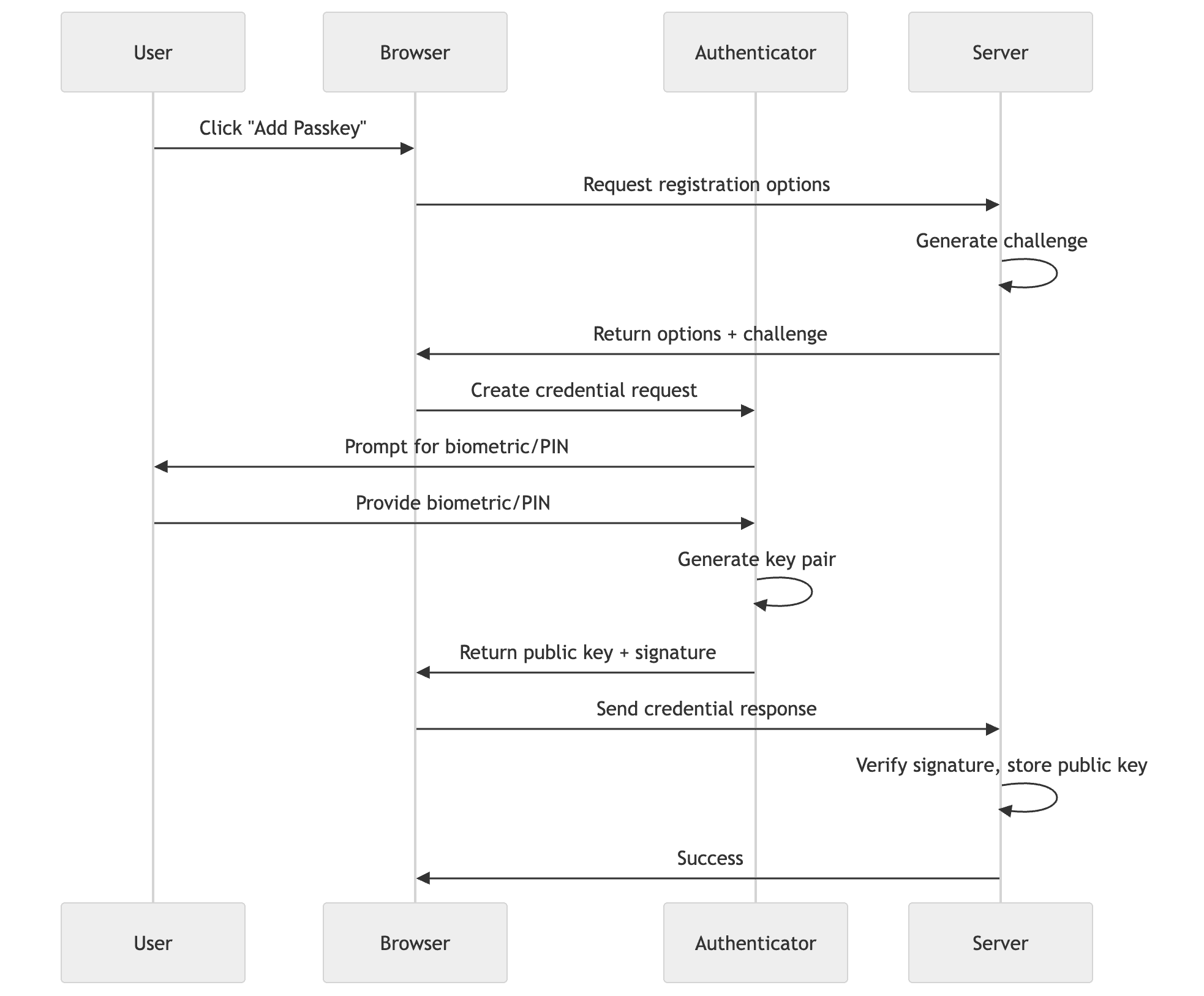
When a user wants to add a passkey, your server generates a random challenge. The authenticator creates a new key pair, signs the challenge and origin with the private key, and sends back the public key and signed data. Your server verifies the signature and challenge, then stores the public key
The private key never leaves the authenticator. It's stored in secure hardware (the Secure Enclave on Apple devices, TPM on Windows, etc.) and can't be extracted.
Authentication: Signing In with a Passkey
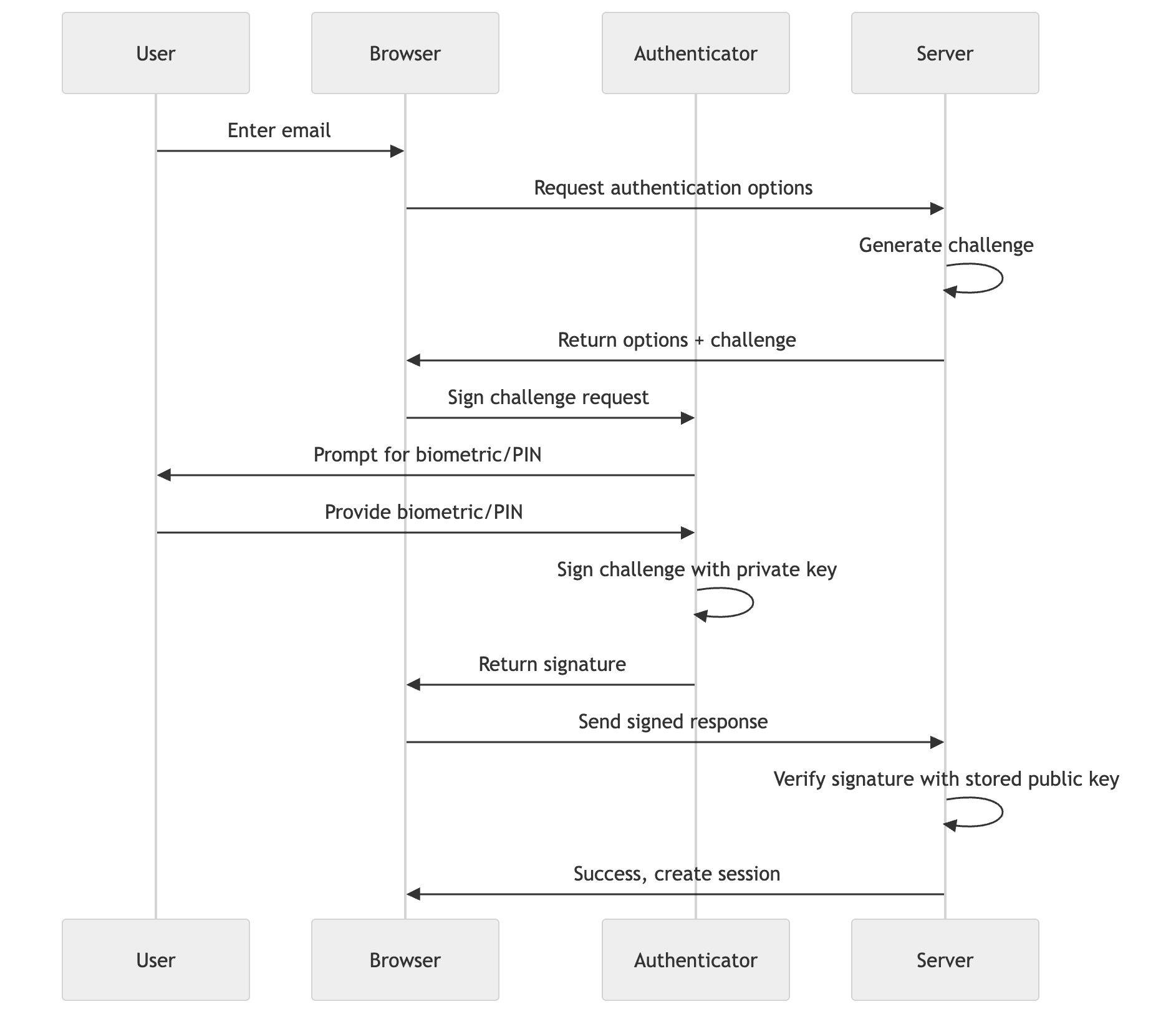
When a user signs in, your server generates a new challenge. The authenticator signs this challenge and origin with the private key it created during registration. Your server verifies the signature using the stored public key and checks that the challenge matches.
The key insight: your server only stores public keys. Even if your database is compromised, attackers can't impersonate users because they don't have the private keys. And because each authentication requires a fresh challenge, captured responses can't be replayed.
Here's how to think about WebAuthn in Rails terms:
WebAuthn Concept
Rails Equivalent
What It Does
Relying Party (RP)
Your Rails app
Issues challenges, verifies responses
Authenticator
Touch ID, YubiKey, etc.
Holds private keys, signs challenges
Credential
WebAuthnCredential model
Stores public key for verification
Challenge
Session value
Random nonce to prevent replay attacks
Ceremony
Controller action
The registration or authentication flow
The key mental shift: your server never sees passwords or private keys. You're verifying cryptographic signatures, not comparing secrets. The authenticator proves it holds the private key by signing a challenge. You verify the signature with the stored public key.
The Stack
Before diving in, here's what we're working with:
Backend: Ruby on Rails 8.0, Devise for authentication
The rp_id (Relying Party ID) is the trickiest part. It must match your domain without the protocol or port. For app.milkstraw.ai, the RP ID is milkstraw.ai. This matters because passkeys registered on the root domain work for all subdomains, but not vice versa.
The allowed_origins setting tells the WebAuthn gem which origins are permitted to make authentication requests. This is a security measure that prevents credentials from being used on malicious sites. Each origin must include the protocol (https://) and, for non-standard ports, the port number. In development, you'll typically include http://localhost:3000. In production, include your actual domain. If a request comes from an origin not in this list, authentication will fail.
The rp_name is the human-readable name of your application shown in the browser’s native security prompts. It helps users identify which site is requesting their biometric or security key.
The credential_options_timeout sets the duration (in milliseconds) the challenge remains valid. We use 120_000 (2 minutes) to give users ample time to interact with their authenticator before the request expires.
We also define two constants for session keys. This keeps our session management consistent across controllers:
SESSION_KEY tracks pending authentications (storing the user's identity while they complete passkey verification). REGISTRATION_CHALLENGE_KEY stores the challenge during passkey registration.
The Frontend: @simplewebauthn/browser
This package handles the browser's WebAuthn API. It provides startRegistration() and startAuthentication() functions that abstract away the complexity of the native APIs.
Side note on route helpers: We use the js-routes gem to generate type-safe route helpers for the frontend. This is a convenience, not a requirement. You could just as easily hardcode the URLs. But if you want to avoid /web_authn/credentials strings scattered throughout your code, js-routes generates functions like web_authn_credentials_path() that mirror Rails' route helpers. It's nice to have, but don't let it distract you from the core implementation.
What Can Go Wrong
Common setup issues that will bite you:
Wrong rp_id: If your RP ID doesn't match your domain, passkeys won't work. For app.milkstraw.ai, the RP ID must be milkstraw.ai (no protocol, no subdomain). Get this wrong and you'll see cryptic "InvalidStateError" messages in the browser console.
Missing origin: If your production URL isn't in allowed_origins, authentication will fail silently. Always include both development (localhost:3000) and production URLs.
HTTPS requirement: WebAuthn only works over HTTPS in production. localhost gets a pass for development, but any other domain needs TLS.
The Database Schema
We need a model for storing WebAuthn credentials. A credential represents a single passkey that a user has registered. Each credential is tied to a specific authenticator (Touch ID on their MacBook, Face ID on their iPhone, a YubiKey, etc.). Users can have multiple credentials, which is important. If they only had one and lost the device, they'd be locked out. Multiple credentials let them register passkeys on different devices as backups for each other.
This is a random identifier the WebAuthn spec requires. It's not your user's database ID. The spec recommends a random value to prevent tracking users across sites.
Standard validations. The sign_count upper bound (2**32 - 1) matches the WebAuthn spec, which defines it as a 32-bit unsigned integer. The external_id must be globally unique (it comes from the authenticator). The nickname only needs to be unique per user.
The web_authn_enabled? method is used to enforce the appropriate authentication path for each user.
Passkey Registration (Adding Passkeys to Existing Accounts)
We implemented password-full registration first. This lets users add passkeys as a second factor while still relying on passwords as the primary authentication. It was our way of evaluating both implementation styles side-by-side before committing to the more streamlined password-less approach.
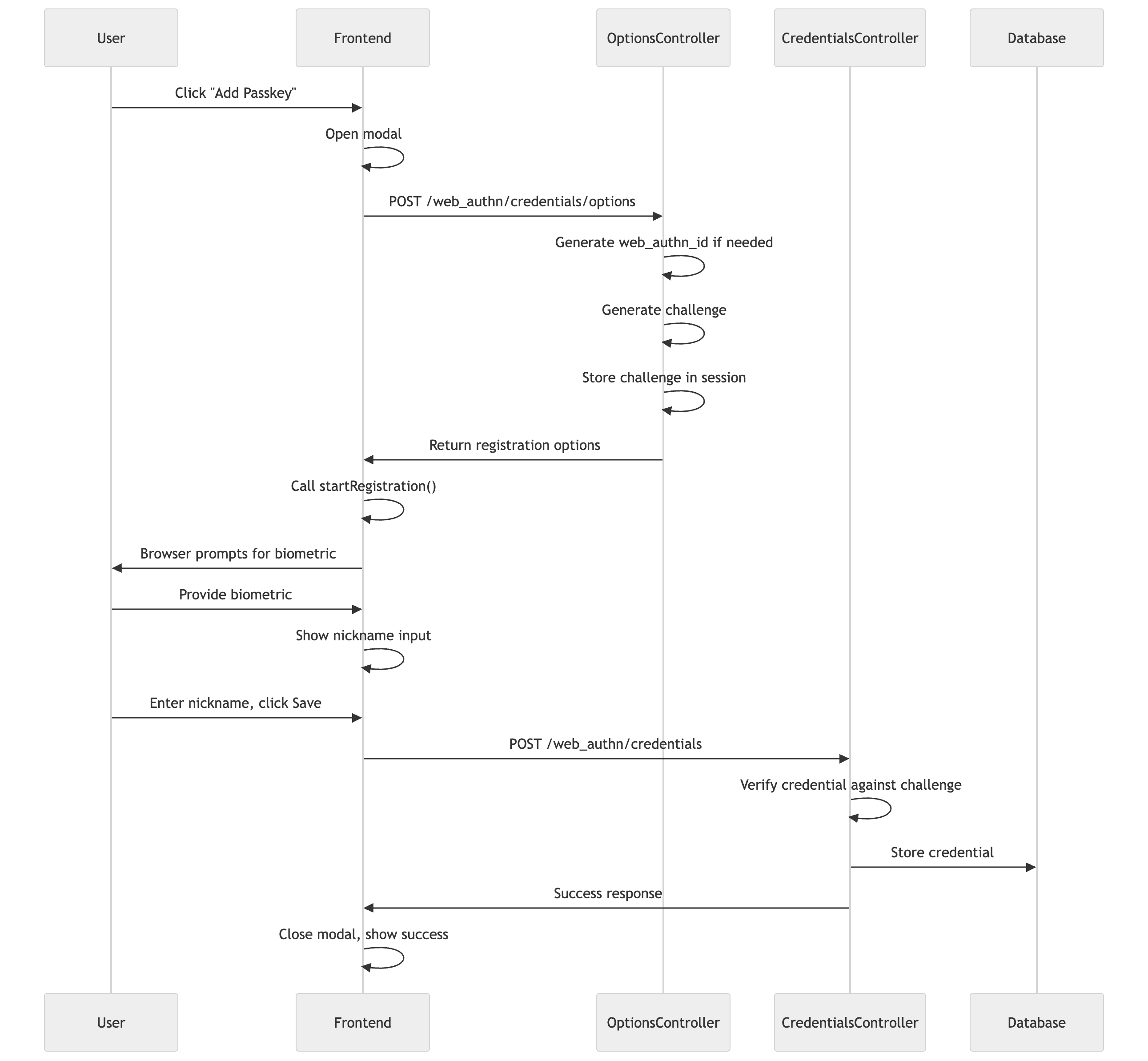
The registration flow works like this:
User clicks "Add passkey" in their profile (they're already authenticated)
Frontend requests registration options from the server
Server generates a challenge and returns it with user info
Frontend triggers the browser's WebAuthn ceremony
User interacts with their authenticator (fingerprint, Face ID, etc.)
Frontend sends the credential response to the server
Server verifies and stores the credential
The Routes [Backend]
Let's start with the routes we need:
# config/routes.rbnamespace:web_authndonamespace:credentialsdoresource:options, only::createendresources:credentials, only: %i[createdestroy]
end
# config/routes.rbnamespace:web_authndonamespace:credentialsdoresource:options, only::createendresources:credentials, only: %i[createdestroy]
end
# config/routes.rbnamespace:web_authndonamespace:credentialsdoresource:options, only::createendresources:credentials, only: %i[createdestroy]
end
This gives us:
POST /web_authn/credentials/options - Get registration options
POST /web_authn/credentials - Create a new credential
DELETE /web_authn/credentials/:id - Remove a credential
The Options Controller [Backend]
Before a user can register a passkey, we need to generate registration options. This includes a random challenge that prevents replay attacks:
Then we call options_for_create with the user's information. The exclude parameter is important. It prevents users from registering the same authenticator twice by listing credential IDs they've already registered:
The authenticator_selection options control what kind of credential gets created:
resident_key: 'discouraged' tells the authenticator not to store the user's identity on the device. Since we're using an email-first flow (users enter their email, then we look up their credentials), we don't need discoverable credentials. This also saves limited storage on hardware security keys.
user_verification: 'discouraged' means the authenticator only needs to test presence (a touch), not verify the user's identity with a PIN or biometric. For 2FA, this makes sense because the password already proves "something you know". We'll change this when we implement password-less in Part 2.
Finally, we store the challenge in the session. We'll verify this challenge when the credential comes back from the browser:
Now for the controller that stores and removes credentials. We'll show a simplified version first that uses redirects.
Heads up: In Part 3, we'll significantly refactor this controller to return JSON instead of redirecting. This is needed to return backup codes to the frontend when users register their first passkey. The registration modal will also need updates to handle JSON responses. For now, this redirect-based version works fine for registration without backup codes.
The create action coordinates three steps: verify the credential, build the record, handle the result. We extract these into private methods to keep the action readable. If validation fails, we use inertia_errors(@credential) to pass ActiveRecord errors to the frontend in a format Inertia.js understands:
# app/controllers/concerns/inertia_config.rbdefinertia_errors(resource)
{
errors:resource.errors.to_hash(true).transform_values(&:first)
}
end
# app/controllers/concerns/inertia_config.rbdefinertia_errors(resource)
{
errors:resource.errors.to_hash(true).transform_values(&:first)
}
end
# app/controllers/concerns/inertia_config.rbdefinertia_errors(resource)
{
errors:resource.errors.to_hash(true).transform_values(&:first)
}
end
This transforms ActiveRecord's errors hash into { errors: { nickname: "Nickname can't be blank" } }. Inertia picks this up and populates form.errors on the frontend (will be discussed later).
verify_web_authn_credential parses the credential response from the browser and verifies it against the challenge we stored earlier:
If verification fails, the webauthn gem raises a WebAuthn::Error. We catch it and redirect with an alert message.
build_web_authn_credential creates the record with the verified data.
handle_successful_registration cleans up the session, and redirects with a success message. We'll expand this method significantly when we add backup codes.
The destroy action lets users remove passkeys they no longer want. This is straightforward, but we'll add cleanup logic later when we implement backup codes.
The Security Page [Backend]
All passkey registration management happens on a dedicated security settings page. This page renders the WebAuthnCredentials component (for listing and adding passkeys) and the BackupCodesCard component (for viewing remaining codes and regenerating them, which will be added in Part 3).
The frontend receives the user's existing credentials to display in a list. The actual credential management happens through the WebAuthn controllers we just built.
The separation from the main profile page is intentional. Security settings deserve their own space. Users looking for their passkeys shouldn't have to scroll past name and email fields.
Handling Parameter Transformation [Backend]
Here's something that tripped us up. Our app uses Inertia.js, and we have a concern that transforms incoming parameters from camelCase to snake_case:
This is great for most endpoints. But the webauthn gem expects specific camelCase keys from the browser: rawId, clientDataJSON, attestationObject. If we transform these to snake_case, the gem can't parse them.
The fix is simple. Skip the transformation for WebAuthn endpoints:
Now for the Vue component. We'll build it up piece by piece.
Note: This modal uses Inertia's form.post() which expects server redirects. In Part 3, we'll refactor this to use fetch() with JSON responses so we can display backup codes when users register their first passkey. The structure stays similar, but the submission logic changes.
First, the basic structure:
<scriptsetuplang="ts">import{useForm}from'@inertiajs/vue3'import{startRegistration}from'@simplewebauthn/browser'import{ref,watch}from'vue'import{web_authn_credentials_options_path,web_authn_credentials_path}from'~/routes.js'import{getCsrfToken}from'~/utils/csrf'constopen = defineModel<boolean>('open',{required:true})constform = useForm({credential:nullas object | null,nickname:''})// Client-side errors from browser WebAuthn API (NotAllowedError, etc.)constclientError = ref<string | null>(null)// Track the WebAuthn flow (fetch + browser ceremony), separate from form.processingconstisRegistering = ref(false)</script>
<scriptsetuplang="ts">import{useForm}from'@inertiajs/vue3'import{startRegistration}from'@simplewebauthn/browser'import{ref,watch}from'vue'import{web_authn_credentials_options_path,web_authn_credentials_path}from'~/routes.js'import{getCsrfToken}from'~/utils/csrf'constopen = defineModel<boolean>('open',{required:true})constform = useForm({credential:nullas object | null,nickname:''})// Client-side errors from browser WebAuthn API (NotAllowedError, etc.)constclientError = ref<string | null>(null)// Track the WebAuthn flow (fetch + browser ceremony), separate from form.processingconstisRegistering = ref(false)</script>
<scriptsetuplang="ts">import{useForm}from'@inertiajs/vue3'import{startRegistration}from'@simplewebauthn/browser'import{ref,watch}from'vue'import{web_authn_credentials_options_path,web_authn_credentials_path}from'~/routes.js'import{getCsrfToken}from'~/utils/csrf'constopen = defineModel<boolean>('open',{required:true})constform = useForm({credential:nullas object | null,nickname:''})// Client-side errors from browser WebAuthn API (NotAllowedError, etc.)constclientError = ref<string | null>(null)// Track the WebAuthn flow (fetch + browser ceremony), separate from form.processingconstisRegistering = ref(false)</script>
We use defineModel for two-way binding with the parent component. The useForm from Inertia manages both the credential data and the nickname field. Inertia's form helper automatically handles validation errors from the server - we'll see this in action when we build the template.
We have two separate refs for different purposes: clientError stores browser-side WebAuthn errors (like when a user cancels the prompt), and isRegistering tracks the WebAuthn flow. We need isRegistering because form.processing only tracks Inertia requests, not our manual fetch calls or the browser's WebAuthn ceremony.
Next, we start the WebAuthn flow when the modal opens:
<scriptsetuplang="ts">// ... previous codewatch(open,async(isOpen)=>{if(isOpen && !form.credential){awaitstartWebAuthnFlow()}elseif(!isOpen){// Reset state when modal closesform.reset()clientError.value = nullisRegistering.value = false}})</script>
<scriptsetuplang="ts">// ... previous codewatch(open,async(isOpen)=>{if(isOpen && !form.credential){awaitstartWebAuthnFlow()}elseif(!isOpen){// Reset state when modal closesform.reset()clientError.value = nullisRegistering.value = false}})</script>
<scriptsetuplang="ts">// ... previous codewatch(open,async(isOpen)=>{if(isOpen && !form.credential){awaitstartWebAuthnFlow()}elseif(!isOpen){// Reset state when modal closesform.reset()clientError.value = nullisRegistering.value = false}})</script>
Why start immediately? Because the browser's WebAuthn prompt appears outside your control. Making users click "Add passkey" then click another button feels sluggish. Starting the ceremony as soon as the modal opens is more responsive.
The WebAuthn flow itself:
<scriptsetuplang="ts">// ... previous codeasyncfunctionstartWebAuthnFlow(){form.clearErrors()clientError.value = nullisRegistering.value = truetry{// Step 1: Get registration options from serverconstoptionsResponse = awaitfetch(web_authn_credentials_options_path(),{method:'POST',headers:{'Content-Type':'application/json','X-CSRF-Token':getCsrfToken()}})if(!optionsResponse.ok){thrownewError('Failed to get registration options')}constoptionsJSON = awaitoptionsResponse.json()// Step 2: Start browser WebAuthn registrationconstregistrationResponse = awaitstartRegistration({optionsJSON})// Step 3: Store credential and show nickname inputform.credential = registrationResponse}catch(err){handleBrowserError(err)}finally{isRegistering.value = false}}</script>
<scriptsetuplang="ts">// ... previous codeasyncfunctionstartWebAuthnFlow(){form.clearErrors()clientError.value = nullisRegistering.value = truetry{// Step 1: Get registration options from serverconstoptionsResponse = awaitfetch(web_authn_credentials_options_path(),{method:'POST',headers:{'Content-Type':'application/json','X-CSRF-Token':getCsrfToken()}})if(!optionsResponse.ok){thrownewError('Failed to get registration options')}constoptionsJSON = awaitoptionsResponse.json()// Step 2: Start browser WebAuthn registrationconstregistrationResponse = awaitstartRegistration({optionsJSON})// Step 3: Store credential and show nickname inputform.credential = registrationResponse}catch(err){handleBrowserError(err)}finally{isRegistering.value = false}}</script>
<scriptsetuplang="ts">// ... previous codeasyncfunctionstartWebAuthnFlow(){form.clearErrors()clientError.value = nullisRegistering.value = truetry{// Step 1: Get registration options from serverconstoptionsResponse = awaitfetch(web_authn_credentials_options_path(),{method:'POST',headers:{'Content-Type':'application/json','X-CSRF-Token':getCsrfToken()}})if(!optionsResponse.ok){thrownewError('Failed to get registration options')}constoptionsJSON = awaitoptionsResponse.json()// Step 2: Start browser WebAuthn registrationconstregistrationResponse = awaitstartRegistration({optionsJSON})// Step 3: Store credential and show nickname inputform.credential = registrationResponse}catch(err){handleBrowserError(err)}finally{isRegistering.value = false}}</script>
Three steps: get options from the server, trigger the browser ceremony, store the result in form.credential. We set isRegistering to true at the start and use finally to set it back to false regardless of success or failure. If anything fails, we show an error and let the user retry.
The error handler translates browser-side WebAuthn errors into human-readable messages:
<scriptsetuplang="ts">// ... previous codefunctionhandleBrowserError(err: unknown){if(errinstanceofError){if(err.name === 'InvalidStateError'){clientError.value = 'This authenticator is already registered.'}elseif(err.name === 'NotAllowedError'){clientError.value = 'Registration was cancelled or timed out.'}else{clientError.value = err.message}}else{clientError.value = 'An unexpected error occurred.'}}</script>
<scriptsetuplang="ts">// ... previous codefunctionhandleBrowserError(err: unknown){if(errinstanceofError){if(err.name === 'InvalidStateError'){clientError.value = 'This authenticator is already registered.'}elseif(err.name === 'NotAllowedError'){clientError.value = 'Registration was cancelled or timed out.'}else{clientError.value = err.message}}else{clientError.value = 'An unexpected error occurred.'}}</script>
<scriptsetuplang="ts">// ... previous codefunctionhandleBrowserError(err: unknown){if(errinstanceofError){if(err.name === 'InvalidStateError'){clientError.value = 'This authenticator is already registered.'}elseif(err.name === 'NotAllowedError'){clientError.value = 'Registration was cancelled or timed out.'}else{clientError.value = err.message}}else{clientError.value = 'An unexpected error occurred.'}}</script>
NotAllowedError is the most common. It happens when users cancel the browser prompt or take too long. InvalidStateError happens when trying to register an authenticator that's already registered (though our exclude parameter should prevent this).
Finally, submitting the nickname. This function gets called when the user clicks the Save button:
Notice there's no onError callback. That's because Inertia's useForm handles errors automatically. When the server returns validation errors via inertia_errors(), they populate form.errors which we can access in the template.
Here's the template that ties everything together:
<template><UModalv-model:open="open"title="Add Passkey":ui="{footer:'justify-end'}"><template#body><!-- Loading state while browser WebAuthn is in progress --><divv-if="isRegistering && !form.credential"class="flex flex-col items-center gap-4 py-8"><UIconname="i-hugeicons-loading-03"class="text-primary size-8 animate-spin"/><pclass="text-muted">Follow your browser's prompts to register your passkey...</p></div><!-- Error state if WebAuthn failed --><divv-else-if="clientError && !form.credential"class="flex flex-col gap-4"><UAlertcolor="error"variant="soft":title="clientError"icon="i-hugeicons-alert-circle"/><divclass="flex justify-end gap-2"><UButtoncolor="neutral"variant="outline"@click="handleClose">
Cancel
</UButton><UButton@click="startWebAuthnFlow">Try again</UButton></div></div><!-- Nickname input after successful WebAuthn registration --><divv-else-if="form.credential"class="flex flex-col gap-4"><UFormFieldlabel="Give your passkey a name to recognize it later."required:error="form.errors.nickname"><UInputv-model="form.nickname"placeholder="Passkey"class="w-full":disabled="form.processing"/></UFormField><divclass="flex justify-end gap-2"><UButtoncolor="neutral"variant="outline":disabled="form.processing"@click="handleClose">
Cancel
</UButton><UButton:loading="form.processing"@click="submitNickname">
Save
</UButton></div></div></template></UModal></template>
<template><UModalv-model:open="open"title="Add Passkey":ui="{footer:'justify-end'}"><template#body><!-- Loading state while browser WebAuthn is in progress --><divv-if="isRegistering && !form.credential"class="flex flex-col items-center gap-4 py-8"><UIconname="i-hugeicons-loading-03"class="text-primary size-8 animate-spin"/><pclass="text-muted">Follow your browser's prompts to register your passkey...</p></div><!-- Error state if WebAuthn failed --><divv-else-if="clientError && !form.credential"class="flex flex-col gap-4"><UAlertcolor="error"variant="soft":title="clientError"icon="i-hugeicons-alert-circle"/><divclass="flex justify-end gap-2"><UButtoncolor="neutral"variant="outline"@click="handleClose">
Cancel
</UButton><UButton@click="startWebAuthnFlow">Try again</UButton></div></div><!-- Nickname input after successful WebAuthn registration --><divv-else-if="form.credential"class="flex flex-col gap-4"><UFormFieldlabel="Give your passkey a name to recognize it later."required:error="form.errors.nickname"><UInputv-model="form.nickname"placeholder="Passkey"class="w-full":disabled="form.processing"/></UFormField><divclass="flex justify-end gap-2"><UButtoncolor="neutral"variant="outline":disabled="form.processing"@click="handleClose">
Cancel
</UButton><UButton:loading="form.processing"@click="submitNickname">
Save
</UButton></div></div></template></UModal></template>
<template><UModalv-model:open="open"title="Add Passkey":ui="{footer:'justify-end'}"><template#body><!-- Loading state while browser WebAuthn is in progress --><divv-if="isRegistering && !form.credential"class="flex flex-col items-center gap-4 py-8"><UIconname="i-hugeicons-loading-03"class="text-primary size-8 animate-spin"/><pclass="text-muted">Follow your browser's prompts to register your passkey...</p></div><!-- Error state if WebAuthn failed --><divv-else-if="clientError && !form.credential"class="flex flex-col gap-4"><UAlertcolor="error"variant="soft":title="clientError"icon="i-hugeicons-alert-circle"/><divclass="flex justify-end gap-2"><UButtoncolor="neutral"variant="outline"@click="handleClose">
Cancel
</UButton><UButton@click="startWebAuthnFlow">Try again</UButton></div></div><!-- Nickname input after successful WebAuthn registration --><divv-else-if="form.credential"class="flex flex-col gap-4"><UFormFieldlabel="Give your passkey a name to recognize it later."required:error="form.errors.nickname"><UInputv-model="form.nickname"placeholder="Passkey"class="w-full":disabled="form.processing"/></UFormField><divclass="flex justify-end gap-2"><UButtoncolor="neutral"variant="outline":disabled="form.processing"@click="handleClose">
Cancel
</UButton><UButton:loading="form.processing"@click="submitNickname">
Save
</UButton></div></div></template></UModal></template>
The template has three states: loading (while the browser WebAuthn prompt is shown), error (if WebAuthn failed), and the nickname form (after successful WebAuthn registration). The key line is :error="form.errors.nickname" - this binds the server validation error directly to the form field. When the server returns inertia_errors(@credential), Inertia automatically populates form.errors.nickname and the error displays inline.
The Parent Component [Frontend]
The registration modal lives inside a WebAuthnCredentials component that displays the user's passkeys and handles deletion:
The component checks for WebAuthn support on mount and hides the "Add passkey" button if the browser doesn't support it. For deletion, we use router.delete() which triggers our CredentialsController#destroy action. The onFinish callback runs regardless of success or failure, cleaning up the modal state.
The template displays a table of existing passkeys with delete buttons, and includes both the register modal and a delete confirmation modal. We won't show the full template here since it's mostly UI code, but the key parts are:
A table showing each passkey's nickname and creation date
An "Add passkey" button that opens WebAuthnRegisterModal
A delete confirmation modal that calls deleteCredential()
What Can Go Wrong
Registration issues you'll encounter:
Challenge expired: If the user takes too long to complete the biometric prompt (or walks away from their computer), the session challenge expires. The credential_options_timeout in your config controls this. 120 seconds is usually enough, but consider showing a "try again" option if authentication fails.
Duplicate credential: Users sometimes try to register the same passkey twice. The external_id unique constraint catches this, but you'll want to show a friendly error message.
User cancelled: Users can dismiss the browser's passkey prompt. Handle the NotAllowedError from the frontend library and let them try again.
Routes Added in This Part
# config/routes.rbnamespace:usersdoresource:security, only::show, controller:'security'endnamespace:web_authndonamespace:credentialsdoresource:options, only::createendresources:credentials, only: %i[createdestroy]
end
# config/routes.rbnamespace:usersdoresource:security, only::show, controller:'security'endnamespace:web_authndonamespace:credentialsdoresource:options, only::createendresources:credentials, only: %i[createdestroy]
end
# config/routes.rbnamespace:usersdoresource:security, only::show, controller:'security'endnamespace:web_authndonamespace:credentialsdoresource:options, only::createendresources:credentials, only: %i[createdestroy]
end
This gives you:
GET /users/security - Security settings page
POST /web_authn/credentials/options - Get registration options
POST /web_authn/credentials - Create a new credential
DELETE /web_authn/credentials/:id - Remove a credential
What's Next
At this point, users can add passkeys to their accounts. The passkeys are stored securely, and users can manage them from their security settings page.
In Part 2, we'll implement authentication - first as 2FA (password + passkey), then as password-less (passkey only). We'll also clean up the code once password-less is working.