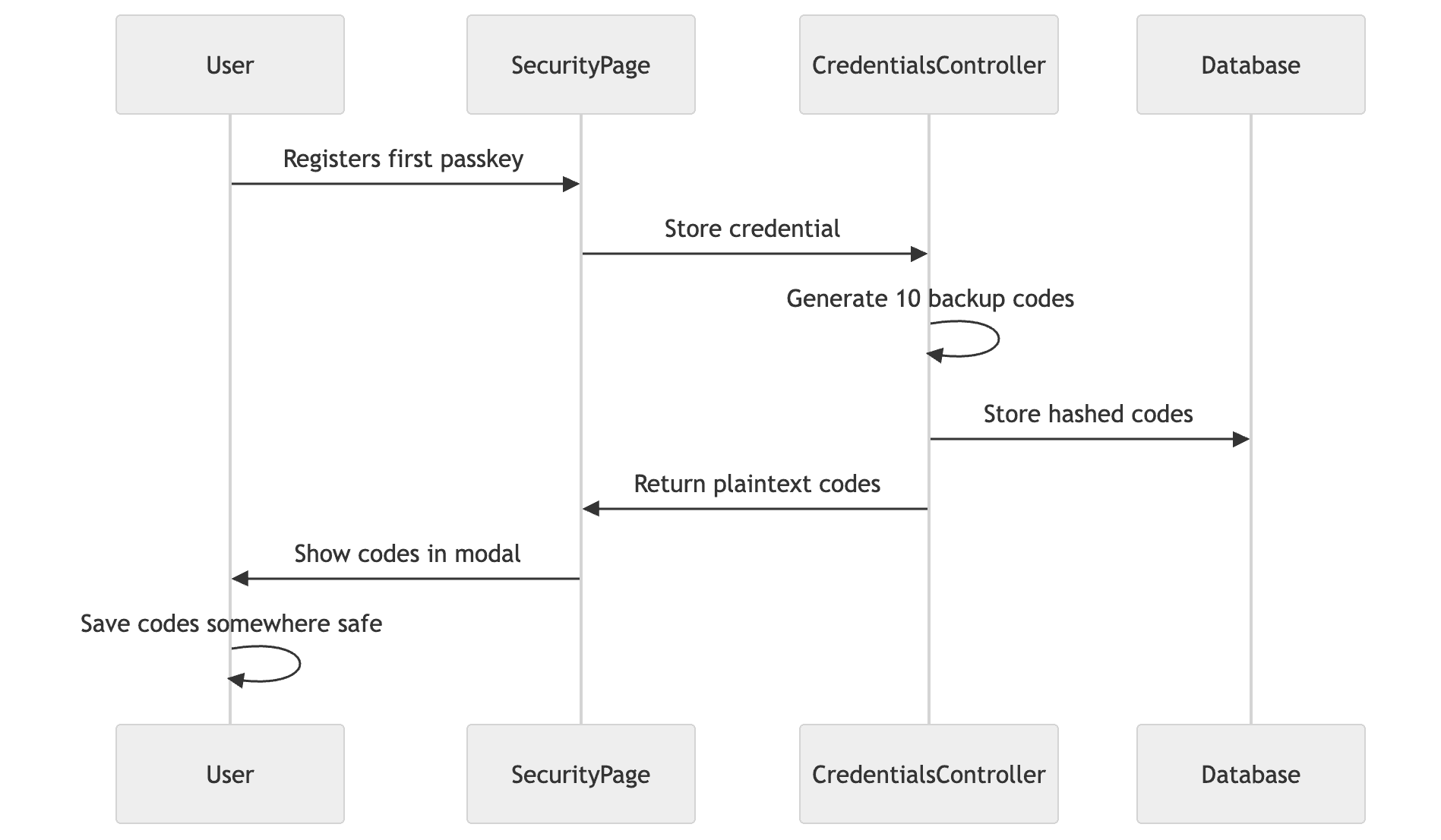
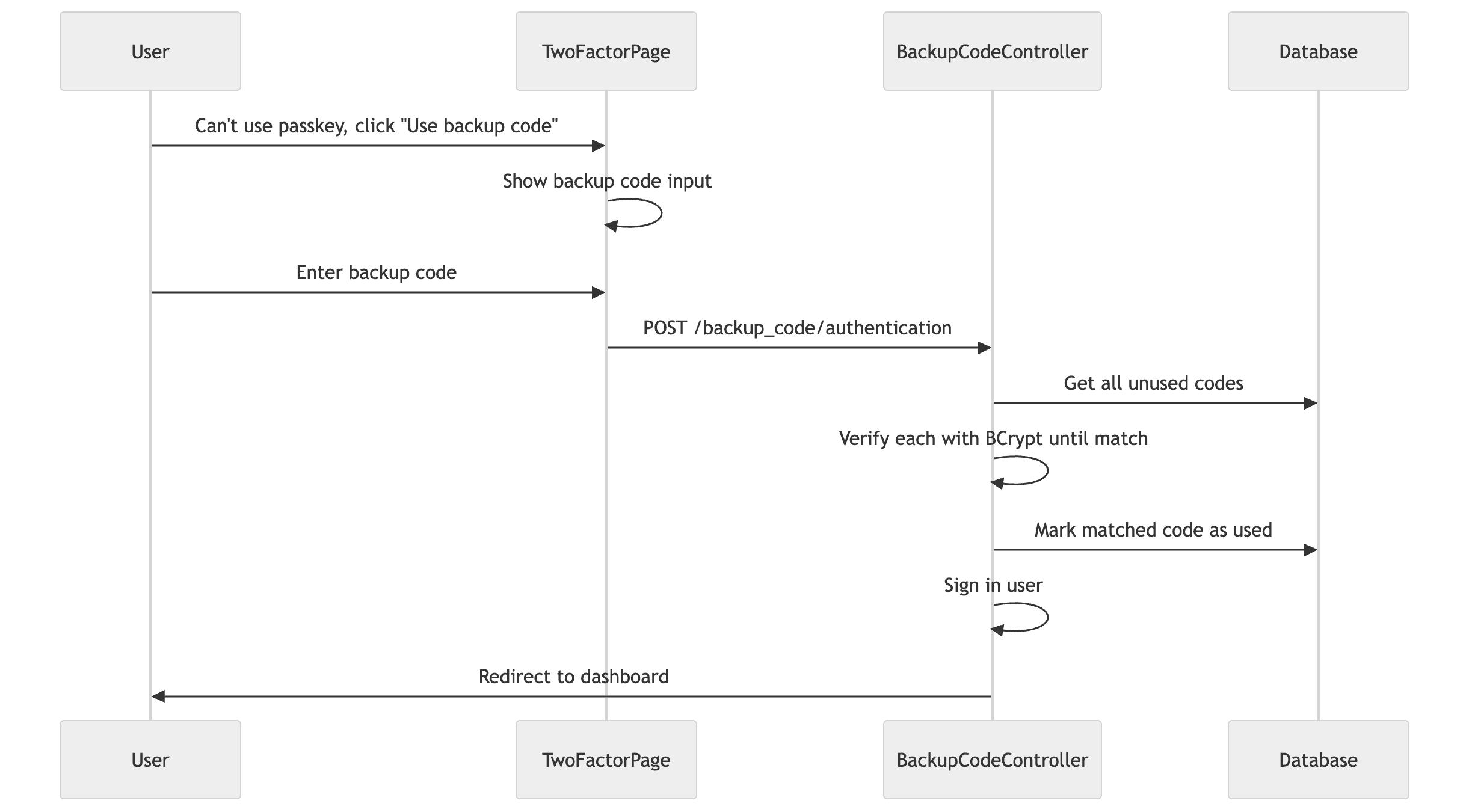
In Part 1, we set up WebAuthn and built passkey registration. In Part 2, we implemented authentication - first as 2FA, then as password-less.
But there's a problem. What happens when a user loses their phone? Or their hardware key breaks? They're locked out of their account with no way back in.
Backup codes solve this. They're single-use recovery codes that users can enter when they can't use their passkey. In this post, we'll implement backup code generation, storage, authentication, and regeneration.
What you'll need to update from previous parts: If you've been following along, this part requires changes to code from Parts 1 and 2:
The credentials controller from Part 1 gets refactored to return JSON (so we can send backup codes to the frontend)
The registration modal from Part 1 changes from form.post() to fetch() to handle JSON responses
The TwoFactorAuth page from Part 2 gets a backup code entry form added
We'll show the complete updated code for each of these.
How Backup Codes Work
The idea is simple: when users register their first passkey, we generate 10 random codes. They save these codes somewhere safe (password manager, printed paper, etc.). If they ever lose access to their passkey, they can sign in with one of these codes. Each code only works once.
Backup Code Generation: When a user registers their first passkey, we generate backup codes automatically. The codes are shown once in a modal, and the user must save them. We only store hashed versions in the database - if someone compromises the database, they can't use the codes.
Backup Code Usage: When a user can't access their passkey (lost phone, broken hardware key), they can use a backup code instead. Each code works only once - after use, it's marked as consumed and can't be reused.
The Database Schema [Backend]
Backup codes need their own table. Each code is stored separately rather than as an array because we need to track which codes have been used:
code_digest: The BCrypt hash of the code (we never store plaintext)
used_at: When the code was consumed (null means unused, a timestamp means used)
The used_at column serves two purposes. First, it lets us query for unused codes (where(used_at: nil)). Second, it provides an audit trail. If you need to investigate suspicious account activity, you can see exactly when backup codes were used.
We also need fields on the User model for rate limiting:
Backup codes are stored as BCrypt hashes, not plaintext. If your database is compromised, attackers can't use the codes.
The normalize method strips formatting. We display codes as XXXXX-XXXXX but accept input with or without the dash. The normalization makes verification flexible:
defnormalize(code)
code.to_s.upcase.gsub(/[^A-Z0-9]/, '')
end
defnormalize(code)
code.to_s.upcase.gsub(/[^A-Z0-9]/, '')
end
defnormalize(code)
code.to_s.upcase.gsub(/[^A-Z0-9]/, '')
end
The mark_as_used! method includes a reload to prevent race conditions. If two requests try to use the same code simultaneously, only one will succeed:
defmark_as_used!raise'Backup code already used'ifreload.used?update!(used_at:Time.current)
end
defmark_as_used!raise'Backup code already used'ifreload.used?update!(used_at:Time.current)
end
defmark_as_used!raise'Backup code already used'ifreload.used?update!(used_at:Time.current)
end
The Generator Service [Backend]
The generator service creates a set of backup codes for a user. It handles the full lifecycle: deleting old codes, generating new ones, hashing them securely, and returning the plaintext versions (which we show to the user once and never store).
The generated codes get formatted with a dash for readability. ABCDE12345 becomes ABCDE-12345. This makes it easier to read and transcribe.
Auto-Generating Codes on First Passkey Registration [Backend]
When users register their first passkey, we automatically generate backup codes. This is important. Without backup codes, losing a passkey means losing account access.
Update the credentials controller we built in Part 1. Here's the complete version with backup code generation:
# app/controllers/web_authn/credentials_controller.rbclassWebAuthn::CredentialsController < ApplicationControllerskip_before_action:underscore_params, only: [:create]
defcreate# Same as Part 1if@credential.savesession.delete(WebAuthn::REGISTRATION_CHALLENGE_KEY)
renderjson: {
backup_codes:generate_backup_codes_if_first_credential,
message:'Passkey registered successfully'
}, status::createdelserenderjson: { errors:@credential.errors.to_hash(true).transform_values(&:first) },
status::unprocessable_contentendenddefdestroy# Same as Part 1endprivatedefverify_web_authn_credential# Same as Part 1rescue::WebAuthn::Error => esession.delete(WebAuthn::REGISTRATION_CHALLENGE_KEY)
renderjson: { error:"Registration failed: #{e.message}" }, status::unprocessable_contentnilenddefbuild_web_authn_credential(web_authn_credential)
# Same as Part 1enddefgenerate_backup_codes_if_first_credentialreturnnilifcurrent_user.web_authn_credentials.many?BackupCodes::Generator.new(current_user).callendend
# app/controllers/web_authn/credentials_controller.rbclassWebAuthn::CredentialsController < ApplicationControllerskip_before_action:underscore_params, only: [:create]
defcreate# Same as Part 1if@credential.savesession.delete(WebAuthn::REGISTRATION_CHALLENGE_KEY)
renderjson: {
backup_codes:generate_backup_codes_if_first_credential,
message:'Passkey registered successfully'
}, status::createdelserenderjson: { errors:@credential.errors.to_hash(true).transform_values(&:first) },
status::unprocessable_contentendenddefdestroy# Same as Part 1endprivatedefverify_web_authn_credential# Same as Part 1rescue::WebAuthn::Error => esession.delete(WebAuthn::REGISTRATION_CHALLENGE_KEY)
renderjson: { error:"Registration failed: #{e.message}" }, status::unprocessable_contentnilenddefbuild_web_authn_credential(web_authn_credential)
# Same as Part 1enddefgenerate_backup_codes_if_first_credentialreturnnilifcurrent_user.web_authn_credentials.many?BackupCodes::Generator.new(current_user).callendend
# app/controllers/web_authn/credentials_controller.rbclassWebAuthn::CredentialsController < ApplicationControllerskip_before_action:underscore_params, only: [:create]
defcreate# Same as Part 1if@credential.savesession.delete(WebAuthn::REGISTRATION_CHALLENGE_KEY)
renderjson: {
backup_codes:generate_backup_codes_if_first_credential,
message:'Passkey registered successfully'
}, status::createdelserenderjson: { errors:@credential.errors.to_hash(true).transform_values(&:first) },
status::unprocessable_contentendenddefdestroy# Same as Part 1endprivatedefverify_web_authn_credential# Same as Part 1rescue::WebAuthn::Error => esession.delete(WebAuthn::REGISTRATION_CHALLENGE_KEY)
renderjson: { error:"Registration failed: #{e.message}" }, status::unprocessable_contentnilenddefbuild_web_authn_credential(web_authn_credential)
# Same as Part 1enddefgenerate_backup_codes_if_first_credentialreturnnilifcurrent_user.web_authn_credentials.many?BackupCodes::Generator.new(current_user).callendend
This is a significant change from the Part 1 version. We now return JSON for all responses, not just WebAuthn errors. Why? Because we need to return backup codes to the frontend on the first passkey registration. The frontend modal needs the actual codes to display them to the user.
The generate_backup_codes_if_first_credential method returns nil for subsequent passkeys (when the user already has credentials), so the JSON response will have backup_codes: null in that case. The frontend handles both cases.
Handling Backup Codes in Registration [Frontend]
Since the backend now always returns JSON, we update the registration modal to handle the response uniformly. The key change is checking whether backup_codes is present in the response:
<scriptsetuplang="ts">import{router}from'@inertiajs/vue3'import{ref}from'vue'importBackupCodesModalfrom'~/components/users/BackupCodesModal.vue'import{web_authn_credentials_path}from'~/routes.js'import{getCsrfToken}from'~/utils/csrf'// State for backup codes (only shown for first passkey)constshowBackupCodesModal = ref(false)constbackupCodes = ref<string[]>([])constsuccessMessage = ref<string | null>(null)consttoast = useToast()asyncfunctionsubmitNickname(){if(!pendingCredential.value)returnnicknameError.value = nullif(!nickname.value.trim()){nicknameError.value = "Nickname can't be blank"return}isRegistering.value = truetry{constresponse = awaitfetch(web_authn_credentials_path(),{method:'POST',headers:{'Content-Type':'application/json','X-CSRF-Token':getCsrfToken()},body:JSON.stringify({credential:pendingCredential.value,nickname:nickname.value.trim()})})if(!response.ok){consterrorData = awaitresponse.json()handleServerError(errorData)return}constdata = awaitresponse.json()successMessage.value = data.message// If backup codes are returned, show them (first passkey only)if(data.backup_codes){backupCodes.value = data.backup_codesshowBackupCodesModal.value = true}else{// Subsequent passkey - just complete registrationhandleRegistrationComplete()}}catch{isRegistering.value = falseclientError.value = 'Registration failed. Please refresh and try again.'}}</script>
<scriptsetuplang="ts">import{router}from'@inertiajs/vue3'import{ref}from'vue'importBackupCodesModalfrom'~/components/users/BackupCodesModal.vue'import{web_authn_credentials_path}from'~/routes.js'import{getCsrfToken}from'~/utils/csrf'// State for backup codes (only shown for first passkey)constshowBackupCodesModal = ref(false)constbackupCodes = ref<string[]>([])constsuccessMessage = ref<string | null>(null)consttoast = useToast()asyncfunctionsubmitNickname(){if(!pendingCredential.value)returnnicknameError.value = nullif(!nickname.value.trim()){nicknameError.value = "Nickname can't be blank"return}isRegistering.value = truetry{constresponse = awaitfetch(web_authn_credentials_path(),{method:'POST',headers:{'Content-Type':'application/json','X-CSRF-Token':getCsrfToken()},body:JSON.stringify({credential:pendingCredential.value,nickname:nickname.value.trim()})})if(!response.ok){consterrorData = awaitresponse.json()handleServerError(errorData)return}constdata = awaitresponse.json()successMessage.value = data.message// If backup codes are returned, show them (first passkey only)if(data.backup_codes){backupCodes.value = data.backup_codesshowBackupCodesModal.value = true}else{// Subsequent passkey - just complete registrationhandleRegistrationComplete()}}catch{isRegistering.value = falseclientError.value = 'Registration failed. Please refresh and try again.'}}</script>
<scriptsetuplang="ts">import{router}from'@inertiajs/vue3'import{ref}from'vue'importBackupCodesModalfrom'~/components/users/BackupCodesModal.vue'import{web_authn_credentials_path}from'~/routes.js'import{getCsrfToken}from'~/utils/csrf'// State for backup codes (only shown for first passkey)constshowBackupCodesModal = ref(false)constbackupCodes = ref<string[]>([])constsuccessMessage = ref<string | null>(null)consttoast = useToast()asyncfunctionsubmitNickname(){if(!pendingCredential.value)returnnicknameError.value = nullif(!nickname.value.trim()){nicknameError.value = "Nickname can't be blank"return}isRegistering.value = truetry{constresponse = awaitfetch(web_authn_credentials_path(),{method:'POST',headers:{'Content-Type':'application/json','X-CSRF-Token':getCsrfToken()},body:JSON.stringify({credential:pendingCredential.value,nickname:nickname.value.trim()})})if(!response.ok){consterrorData = awaitresponse.json()handleServerError(errorData)return}constdata = awaitresponse.json()successMessage.value = data.message// If backup codes are returned, show them (first passkey only)if(data.backup_codes){backupCodes.value = data.backup_codesshowBackupCodesModal.value = true}else{// Subsequent passkey - just complete registrationhandleRegistrationComplete()}}catch{isRegistering.value = falseclientError.value = 'Registration failed. Please refresh and try again.'}}</script>
The response handling is now simpler. We always use fetch() and check if data.backup_codes is present. If it is (first passkey), we show the backup codes modal. If not (subsequent passkey), we complete the registration immediately.
After the user confirms they've saved their backup codes, we clean up and reload the page:
When backup codes are generated, users must acknowledge saving them before continuing:
<scriptsetuplang="ts">import{useClipboard}from'@vueuse/core'import{computed,ref}from'vue'constprops = defineProps<{codes: string[]}>()constopen = defineModel<boolean>('open',{required:true})constemit = defineEmits<{confirmed:[]}>()consthasSaved = ref(false)constdownloadLink = ref<HTMLAnchorElement | null>(null)// Prepare codes for clipboard (one per line)constcodesText = computed(()=>props.codes.join('\n'))const{copy,copied} = useClipboard({source:codesText,copiedDuring:2000})functiondownload(){consttext = `Backup Codes\n============\n\n${props.codes.join('\n')}\n\nKeep these codes safe. Each code can only be used once.`constblob = newBlob([text],{type:'text/plain'})consturl = URL.createObjectURL(blob)if(downloadLink.value){downloadLink.value.href = urldownloadLink.value.click()URL.revokeObjectURL(url)}}functionhandleConfirm(){emit('confirmed')open.value = false}</script><template><UModalv-model:open="open"title="Save your backup codes":close="false":dismissible="false"><template#body><UAlertcolor="warning"title="Save these codes now"description="You won't be able to see them again. Store them in a safe place like a password manager."/><divclass="grid grid-cols-2 gap-2 font-mono"><divv-for="codeincodes":key="code">
{{ code}}</div></div><divclass="flex gap-2"><UButton@click="copy()">
{{ copied ? 'Copied!' : 'Copy all'}}</UButton><UButton@click="download">Download</UButton></div><UCheckboxv-model="hasSaved"label="I have saved these backup codes in a safe place"/><UButton:disabled="!hasSaved"@click="handleConfirm">
I've saved my codes
</UButton><!-- Hidden download link for Vue-compatible file download --><aref="downloadLink"download="backup-codes.txt"class="hidden"/></template></UModal></template>
<scriptsetuplang="ts">import{useClipboard}from'@vueuse/core'import{computed,ref}from'vue'constprops = defineProps<{codes: string[]}>()constopen = defineModel<boolean>('open',{required:true})constemit = defineEmits<{confirmed:[]}>()consthasSaved = ref(false)constdownloadLink = ref<HTMLAnchorElement | null>(null)// Prepare codes for clipboard (one per line)constcodesText = computed(()=>props.codes.join('\n'))const{copy,copied} = useClipboard({source:codesText,copiedDuring:2000})functiondownload(){consttext = `Backup Codes\n============\n\n${props.codes.join('\n')}\n\nKeep these codes safe. Each code can only be used once.`constblob = newBlob([text],{type:'text/plain'})consturl = URL.createObjectURL(blob)if(downloadLink.value){downloadLink.value.href = urldownloadLink.value.click()URL.revokeObjectURL(url)}}functionhandleConfirm(){emit('confirmed')open.value = false}</script><template><UModalv-model:open="open"title="Save your backup codes":close="false":dismissible="false"><template#body><UAlertcolor="warning"title="Save these codes now"description="You won't be able to see them again. Store them in a safe place like a password manager."/><divclass="grid grid-cols-2 gap-2 font-mono"><divv-for="codeincodes":key="code">
{{ code}}</div></div><divclass="flex gap-2"><UButton@click="copy()">
{{ copied ? 'Copied!' : 'Copy all'}}</UButton><UButton@click="download">Download</UButton></div><UCheckboxv-model="hasSaved"label="I have saved these backup codes in a safe place"/><UButton:disabled="!hasSaved"@click="handleConfirm">
I've saved my codes
</UButton><!-- Hidden download link for Vue-compatible file download --><aref="downloadLink"download="backup-codes.txt"class="hidden"/></template></UModal></template>
<scriptsetuplang="ts">import{useClipboard}from'@vueuse/core'import{computed,ref}from'vue'constprops = defineProps<{codes: string[]}>()constopen = defineModel<boolean>('open',{required:true})constemit = defineEmits<{confirmed:[]}>()consthasSaved = ref(false)constdownloadLink = ref<HTMLAnchorElement | null>(null)// Prepare codes for clipboard (one per line)constcodesText = computed(()=>props.codes.join('\n'))const{copy,copied} = useClipboard({source:codesText,copiedDuring:2000})functiondownload(){consttext = `Backup Codes\n============\n\n${props.codes.join('\n')}\n\nKeep these codes safe. Each code can only be used once.`constblob = newBlob([text],{type:'text/plain'})consturl = URL.createObjectURL(blob)if(downloadLink.value){downloadLink.value.href = urldownloadLink.value.click()URL.revokeObjectURL(url)}}functionhandleConfirm(){emit('confirmed')open.value = false}</script><template><UModalv-model:open="open"title="Save your backup codes":close="false":dismissible="false"><template#body><UAlertcolor="warning"title="Save these codes now"description="You won't be able to see them again. Store them in a safe place like a password manager."/><divclass="grid grid-cols-2 gap-2 font-mono"><divv-for="codeincodes":key="code">
{{ code}}</div></div><divclass="flex gap-2"><UButton@click="copy()">
{{ copied ? 'Copied!' : 'Copy all'}}</UButton><UButton@click="download">Download</UButton></div><UCheckboxv-model="hasSaved"label="I have saved these backup codes in a safe place"/><UButton:disabled="!hasSaved"@click="handleConfirm">
I've saved my codes
</UButton><!-- Hidden download link for Vue-compatible file download --><aref="downloadLink"download="backup-codes.txt"class="hidden"/></template></UModal></template>
The modal is non-dismissible (:close="false" and :dismissible="false"). Users can't close it by clicking outside or pressing escape. They must check the box and click the button. This ensures they've at least seen the codes.
We provide two ways to save: copy to clipboard or download as a file. The clipboard uses VueUse's useClipboard for a clean implementation. The download uses a hidden anchor element trick that works across browsers.
Rate limiting happens at two levels. Rack-level limits (5 requests per minute) prevent request flooding. Application-level limits (10 failed attempts) trigger a 30-minute lockout:
ifnew_attempts >= MAX_FAILED_ATTEMPTSuser.update!(
failed_backup_code_attempts:0,
locked_backup_codes_until:LOCKOUT_DURATION.from_now
)
end
ifnew_attempts >= MAX_FAILED_ATTEMPTSuser.update!(
failed_backup_code_attempts:0,
locked_backup_codes_until:LOCKOUT_DURATION.from_now
)
end
ifnew_attempts >= MAX_FAILED_ATTEMPTSuser.update!(
failed_backup_code_attempts:0,
locked_backup_codes_until:LOCKOUT_DURATION.from_now
)
end
Why reset the counter when locking? Because the lock itself is the punishment. If we kept the counter at 10, the next failed attempt after unlock would immediately lock again.
Code verification iterates through unused codes and checks each one:
This is O(n) where n is at most 10, which is fine. We could add an index on the hash, but BCrypt hashes are salted so we'd need to check each one anyway.
We only mark the code as used after confirming the user can sign in:
This prevents a subtle bug. If a user's account is locked (too many failed password attempts), Devise's active_for_authentication? returns false. Without this check, we'd consume their backup code but not let them in.
What Can Go Wrong
Backup code issues to watch for:
BCrypt timing: We hash codes with BCrypt (cost 12), so verification takes ~250ms per code. With 10 codes to check, worst case is 2.5 seconds. Users might think it's broken. Consider showing a loading state.
Rate limiting: Without limits, attackers can brute-force codes. We use both Rack-level (5/min per IP) and application-level (10 failures = 30-minute lockout) limits.
Code already used: Users sometimes try to reuse a code. Show a clear error message explaining the code has already been used.
All codes exhausted: If all codes are used, the user is locked out. Show a warning when codes are running low (e.g., "You have 2 backup codes remaining").
Adding Backup Code Entry to the 2FA Page [Frontend]
Remember the TwoFactorAuth page from Part 2? We need to update it to handle backup code entry. Rather than navigating to a separate page, we add a toggle that lets users switch between passkey authentication and backup code entry on the same page.
First, add the state and form for backup codes:
<scriptsetuplang="ts">import{useForm}from'@inertiajs/vue3'import{backup_code_authentication_path}from'~/routes.js'// ... existing passkey code// Toggle between passkey and backup codeconstuseBackupCode = ref(false)// Backup code form using Inertia's useFormconstbackupCodeForm = useForm({code:''})functionsubmitBackupCode(){error.value = nullbackupCodeForm.post(backup_code_authentication_path())}functiontoggleMethod(){useBackupCode.value = !useBackupCode.valueerror.value = nullbackupCodeForm.reset()}</script>
<scriptsetuplang="ts">import{useForm}from'@inertiajs/vue3'import{backup_code_authentication_path}from'~/routes.js'// ... existing passkey code// Toggle between passkey and backup codeconstuseBackupCode = ref(false)// Backup code form using Inertia's useFormconstbackupCodeForm = useForm({code:''})functionsubmitBackupCode(){error.value = nullbackupCodeForm.post(backup_code_authentication_path())}functiontoggleMethod(){useBackupCode.value = !useBackupCode.valueerror.value = nullbackupCodeForm.reset()}</script>
<scriptsetuplang="ts">import{useForm}from'@inertiajs/vue3'import{backup_code_authentication_path}from'~/routes.js'// ... existing passkey code// Toggle between passkey and backup codeconstuseBackupCode = ref(false)// Backup code form using Inertia's useFormconstbackupCodeForm = useForm({code:''})functionsubmitBackupCode(){error.value = nullbackupCodeForm.post(backup_code_authentication_path())}functiontoggleMethod(){useBackupCode.value = !useBackupCode.valueerror.value = nullbackupCodeForm.reset()}</script>
Notice we use Inertia's useForm for backup codes but fetch() for passkeys. Why the difference? Backup code submission is a simple form post (one field, standard request/response). useForm gives us automatic loading states via backupCodeForm.processing and cleaner error handling. Passkey authentication needs the two-step fetch pattern (get challenge first, then submit response) because of the browser's WebAuthn ceremony between the two requests.
The template uses conditional rendering to switch between views:
<template><AuthLayout><template#card-content><!-- Passkey Authentication --><templatev-if="!useBackupCode"><!-- ... existing passkey UI ... --><UButton:disabled="!isSupported || isAuthenticating":loading="isAuthenticating"blocksize="lg"@click="authenticate">
{{ isAuthenticating ? 'Verifying...' : 'Sign in with passkey'}}</UButton><USeparatorlabel="OR"/><UButtonvariant="link"color="neutral"block@click="toggleMethod">
Use a backup code
</UButton></template><!-- Backup Code Entry --><templatev-else><AuthHeadericon="i-hugeicons-key-01"title="Enter backup code"/><pclass="text-muted text-center text-sm">Enter one of your backup codes to sign in.</p><form@submit.prevent="submitBackupCode"><UFormFieldlabel="Backup code"required><UInputv-model="backupCodeForm.code"placeholder="XXXXX-XXXXX"class="font-mono"size="lg"autofocus:disabled="backupCodeForm.processing"/></UFormField><UButtontype="submit":loading="backupCodeForm.processing"blocksize="lg">
{{ backupCodeForm.processing ? 'Verifying...' : 'Sign in with backup code'}}</UButton></form><USeparatorlabel="OR"/><UButtonvariant="link"color="neutral"block@click="toggleMethod">
Use passkey instead
</UButton></template></template></AuthLayout></template>
<template><AuthLayout><template#card-content><!-- Passkey Authentication --><templatev-if="!useBackupCode"><!-- ... existing passkey UI ... --><UButton:disabled="!isSupported || isAuthenticating":loading="isAuthenticating"blocksize="lg"@click="authenticate">
{{ isAuthenticating ? 'Verifying...' : 'Sign in with passkey'}}</UButton><USeparatorlabel="OR"/><UButtonvariant="link"color="neutral"block@click="toggleMethod">
Use a backup code
</UButton></template><!-- Backup Code Entry --><templatev-else><AuthHeadericon="i-hugeicons-key-01"title="Enter backup code"/><pclass="text-muted text-center text-sm">Enter one of your backup codes to sign in.</p><form@submit.prevent="submitBackupCode"><UFormFieldlabel="Backup code"required><UInputv-model="backupCodeForm.code"placeholder="XXXXX-XXXXX"class="font-mono"size="lg"autofocus:disabled="backupCodeForm.processing"/></UFormField><UButtontype="submit":loading="backupCodeForm.processing"blocksize="lg">
{{ backupCodeForm.processing ? 'Verifying...' : 'Sign in with backup code'}}</UButton></form><USeparatorlabel="OR"/><UButtonvariant="link"color="neutral"block@click="toggleMethod">
Use passkey instead
</UButton></template></template></AuthLayout></template>
<template><AuthLayout><template#card-content><!-- Passkey Authentication --><templatev-if="!useBackupCode"><!-- ... existing passkey UI ... --><UButton:disabled="!isSupported || isAuthenticating":loading="isAuthenticating"blocksize="lg"@click="authenticate">
{{ isAuthenticating ? 'Verifying...' : 'Sign in with passkey'}}</UButton><USeparatorlabel="OR"/><UButtonvariant="link"color="neutral"block@click="toggleMethod">
Use a backup code
</UButton></template><!-- Backup Code Entry --><templatev-else><AuthHeadericon="i-hugeicons-key-01"title="Enter backup code"/><pclass="text-muted text-center text-sm">Enter one of your backup codes to sign in.</p><form@submit.prevent="submitBackupCode"><UFormFieldlabel="Backup code"required><UInputv-model="backupCodeForm.code"placeholder="XXXXX-XXXXX"class="font-mono"size="lg"autofocus:disabled="backupCodeForm.processing"/></UFormField><UButtontype="submit":loading="backupCodeForm.processing"blocksize="lg">
{{ backupCodeForm.processing ? 'Verifying...' : 'Sign in with backup code'}}</UButton></form><USeparatorlabel="OR"/><UButtonvariant="link"color="neutral"block@click="toggleMethod">
Use passkey instead
</UButton></template></template></AuthLayout></template>
This keeps everything on one page. Users don't navigate away to enter a backup code. They click "Use a backup code", enter it, and submit. If they change their mind, they click "Use passkey instead" to go back.
Backup Code Regeneration [Backend]
Users need a way to regenerate codes if they're running low or think they've been compromised. Add the route:
The web_authn_enabled? check prevents users from regenerating backup codes if they don't have any passkeys. This could happen if someone tries to access the endpoint directly.
The frontend shows a confirmation modal (regenerating invalidates existing codes), then displays the new codes:
<scriptsetuplang="ts">import{ref}from'vue'importBackupCodesModalfrom'~/components/users/BackupCodesModal.vue'import{users_backup_codes_path}from'~/routes.js'import{getCsrfToken}from'~/utils/csrf'defineProps<{remaining: number }>()constemit = defineEmits<{regenerated:[]}>()constshowConfirmModal = ref(false)constshowCodesModal = ref(false)constgeneratedCodes = ref<string[]>([])constisRegenerating = ref(false)consterror = ref<string | null>(null)asyncfunctionregenerateCodes(){isRegenerating.value = trueerror.value = nulltry{constresponse = awaitfetch(users_backup_codes_path(),{method:'POST',headers:{'Content-Type':'application/json','X-CSRF-Token':getCsrfToken()}})if(!response.ok){thrownewError('Failed to regenerate backup codes')}constdata = awaitresponse.json()generatedCodes.value = data.backup_codes// Close confirmation, show new codesshowConfirmModal.value = falseshowCodesModal.value = true}catch(err){error.value = errinstanceofError ? err.message : 'An unexpected error occurred'}finally{isRegenerating.value = false}}functionhandleCodesConfirmed(){emit('regenerated')}</script><template><UCard><template#header><divclass="flex items-center justify-between"><div><h3>Backup codes</h3><pclass="text-muted text-sm">Use these one-time codes if you lose access to your passkey</p></div><UButtonsize="sm"variant="outline"@click="showConfirmModal = true">
Regenerate
</UButton></div></template><divclass="flex items-center gap-3"><divclass="bg-muted flex size-10 items-center justify-center rounded-lg"><UIconname="i-hugeicons-key-01"class="text-muted size-5"/></div><div><pclass="font-medium">{{ remaining}} of 10 codes remaining</p><pclass="text-muted text-xs">Each code can only be used once</p></div></div><!-- Confirmation modal --><UModalv-model:open="showConfirmModal"title="Regenerate backup codes?"><template#body><UAlertcolor="warning"title="This will invalidate your current codes"description="All existing backup codes will be permanently deleted. You'll receive 10 new codes that you must save."/><divclass="mt-6 flex justify-end gap-2"><UButtonvariant="outline":disabled="isRegenerating"@click="showConfirmModal = false">
Cancel
</UButton><UButtoncolor="error":loading="isRegenerating"@click="regenerateCodes">
Regenerate codes
</UButton></div></template></UModal><!-- Show new codes --><BackupCodesModalv-model:open="showCodesModal":codes="generatedCodes"@confirmed="handleCodesConfirmed"/></UCard></template>
<scriptsetuplang="ts">import{ref}from'vue'importBackupCodesModalfrom'~/components/users/BackupCodesModal.vue'import{users_backup_codes_path}from'~/routes.js'import{getCsrfToken}from'~/utils/csrf'defineProps<{remaining: number }>()constemit = defineEmits<{regenerated:[]}>()constshowConfirmModal = ref(false)constshowCodesModal = ref(false)constgeneratedCodes = ref<string[]>([])constisRegenerating = ref(false)consterror = ref<string | null>(null)asyncfunctionregenerateCodes(){isRegenerating.value = trueerror.value = nulltry{constresponse = awaitfetch(users_backup_codes_path(),{method:'POST',headers:{'Content-Type':'application/json','X-CSRF-Token':getCsrfToken()}})if(!response.ok){thrownewError('Failed to regenerate backup codes')}constdata = awaitresponse.json()generatedCodes.value = data.backup_codes// Close confirmation, show new codesshowConfirmModal.value = falseshowCodesModal.value = true}catch(err){error.value = errinstanceofError ? err.message : 'An unexpected error occurred'}finally{isRegenerating.value = false}}functionhandleCodesConfirmed(){emit('regenerated')}</script><template><UCard><template#header><divclass="flex items-center justify-between"><div><h3>Backup codes</h3><pclass="text-muted text-sm">Use these one-time codes if you lose access to your passkey</p></div><UButtonsize="sm"variant="outline"@click="showConfirmModal = true">
Regenerate
</UButton></div></template><divclass="flex items-center gap-3"><divclass="bg-muted flex size-10 items-center justify-center rounded-lg"><UIconname="i-hugeicons-key-01"class="text-muted size-5"/></div><div><pclass="font-medium">{{ remaining}} of 10 codes remaining</p><pclass="text-muted text-xs">Each code can only be used once</p></div></div><!-- Confirmation modal --><UModalv-model:open="showConfirmModal"title="Regenerate backup codes?"><template#body><UAlertcolor="warning"title="This will invalidate your current codes"description="All existing backup codes will be permanently deleted. You'll receive 10 new codes that you must save."/><divclass="mt-6 flex justify-end gap-2"><UButtonvariant="outline":disabled="isRegenerating"@click="showConfirmModal = false">
Cancel
</UButton><UButtoncolor="error":loading="isRegenerating"@click="regenerateCodes">
Regenerate codes
</UButton></div></template></UModal><!-- Show new codes --><BackupCodesModalv-model:open="showCodesModal":codes="generatedCodes"@confirmed="handleCodesConfirmed"/></UCard></template>
<scriptsetuplang="ts">import{ref}from'vue'importBackupCodesModalfrom'~/components/users/BackupCodesModal.vue'import{users_backup_codes_path}from'~/routes.js'import{getCsrfToken}from'~/utils/csrf'defineProps<{remaining: number }>()constemit = defineEmits<{regenerated:[]}>()constshowConfirmModal = ref(false)constshowCodesModal = ref(false)constgeneratedCodes = ref<string[]>([])constisRegenerating = ref(false)consterror = ref<string | null>(null)asyncfunctionregenerateCodes(){isRegenerating.value = trueerror.value = nulltry{constresponse = awaitfetch(users_backup_codes_path(),{method:'POST',headers:{'Content-Type':'application/json','X-CSRF-Token':getCsrfToken()}})if(!response.ok){thrownewError('Failed to regenerate backup codes')}constdata = awaitresponse.json()generatedCodes.value = data.backup_codes// Close confirmation, show new codesshowConfirmModal.value = falseshowCodesModal.value = true}catch(err){error.value = errinstanceofError ? err.message : 'An unexpected error occurred'}finally{isRegenerating.value = false}}functionhandleCodesConfirmed(){emit('regenerated')}</script><template><UCard><template#header><divclass="flex items-center justify-between"><div><h3>Backup codes</h3><pclass="text-muted text-sm">Use these one-time codes if you lose access to your passkey</p></div><UButtonsize="sm"variant="outline"@click="showConfirmModal = true">
Regenerate
</UButton></div></template><divclass="flex items-center gap-3"><divclass="bg-muted flex size-10 items-center justify-center rounded-lg"><UIconname="i-hugeicons-key-01"class="text-muted size-5"/></div><div><pclass="font-medium">{{ remaining}} of 10 codes remaining</p><pclass="text-muted text-xs">Each code can only be used once</p></div></div><!-- Confirmation modal --><UModalv-model:open="showConfirmModal"title="Regenerate backup codes?"><template#body><UAlertcolor="warning"title="This will invalidate your current codes"description="All existing backup codes will be permanently deleted. You'll receive 10 new codes that you must save."/><divclass="mt-6 flex justify-end gap-2"><UButtonvariant="outline":disabled="isRegenerating"@click="showConfirmModal = false">
Cancel
</UButton><UButtoncolor="error":loading="isRegenerating"@click="regenerateCodes">
Regenerate codes
</UButton></div></template></UModal><!-- Show new codes --><BackupCodesModalv-model:open="showCodesModal":codes="generatedCodes"@confirmed="handleCodesConfirmed"/></UCard></template>
Auto-Deleting Backup Codes When Last Passkey Is Removed [Backend]
If a user removes their last passkey, we delete their backup codes too:
This prevents a confusing state where users have backup codes but nothing to back up. It also cleans up the web_authn_id since they're no longer using WebAuthn.
The backup_codes_remaining prop tells users how many codes they have left. When it gets low, you can show a warning suggesting they regenerate their codes.